1. Introducció
The MINISFORUM MS-S1 MAX is a high-performance Mini AI Workstation PC designed for demanding AI workflows, 3D rendering, video editing, and complex computational tasks. It features an AMD Ryzen AI Max+ 395 APU, integrating a Zen 5 architecture CPU, RDNA 3.5 GPU, and a powerful NPU. This manual provides essential information for setting up, operating, maintaining, and troubleshooting your device.

Image: The MINISFORUM MS-S1 MAX Mini AI Workstation PC, showcasing its compact design and powerful capabilities.
2. Contingut del paquet
Verifiqueu que tots els elements siguin presents al paquet:
- MINISFORUM MS-S1 MAX Mini AI Workstation PC
- Adaptador/cable de corrent
- Manual d'usuari (aquest document)
- (Optional) VESA Mount Kit
- (Optional) Additional accessories depending on configuration
3. Instruccions de configuració
3.1 Connexió de perifèrics
Before powering on your MS-S1 MAX, connect all necessary peripherals.
- Connecta la pantalla: Use an HDMI 2.1 cable to connect your monitor to the HDMI port on the rear of the PC. USB4 ports can also be used for display output.
- Connecteu el teclat i el ratolí: Plug your USB keyboard and mouse into the available USB ports.
- Connectar la xarxa: For wired internet access, connect an Ethernet cable to one of the 10GbE LAN ports. For wireless connectivity, ensure Wi-Fi 7 is enabled in the operating system.
- Connectar l'alimentació: Insert the power cable into the AC input port on the rear of the PC, then plug the other end into a power outlet.

Imatge: Detallada view of the front and rear interface ports, including USB4 V2, 10GbE LAN, and HDMI 2.1.
3.2 Encès inicial
After connecting all peripherals and power:
- Premeu el botó d'engegada que es troba al panell frontal de l'ordinador.
- The system will boot up. Follow the on-screen instructions to complete the operating system setup (e.g., Windows 11 Pro).
4. Instruccions de funcionament
4.1 Understanding the APU and Memory
The MS-S1 MAX is powered by an AMD Ryzen AI Max+ 395 APU, featuring a 16-core/32-thread Zen 5 CPU, RDNA 3.5 GPU, and a 50 TOPS NPU, delivering a total system output of 126 TOPS. It is equipped with up to 128GB LPDDR5x-8000MT/s Unified Memory Architecture (UMA) RAM, which allows the CPU and GPU to share a high-bandwidth memory pool, reducing latency and improving performance for AI, 3D, and video editing tasks.

Image: Diagram illustrating the AMD Ryzen AI Max+ 395 APU with Zen 5 CPU, RDNA 3.5 GPU, and NPU for AI performance.

Image: Visual representation of the Unified Memory Architecture (UMA) supporting up to 128GB of LPDDR5x-8000MT/s quad-channel memory.
4.2 Switchable Performance Modes
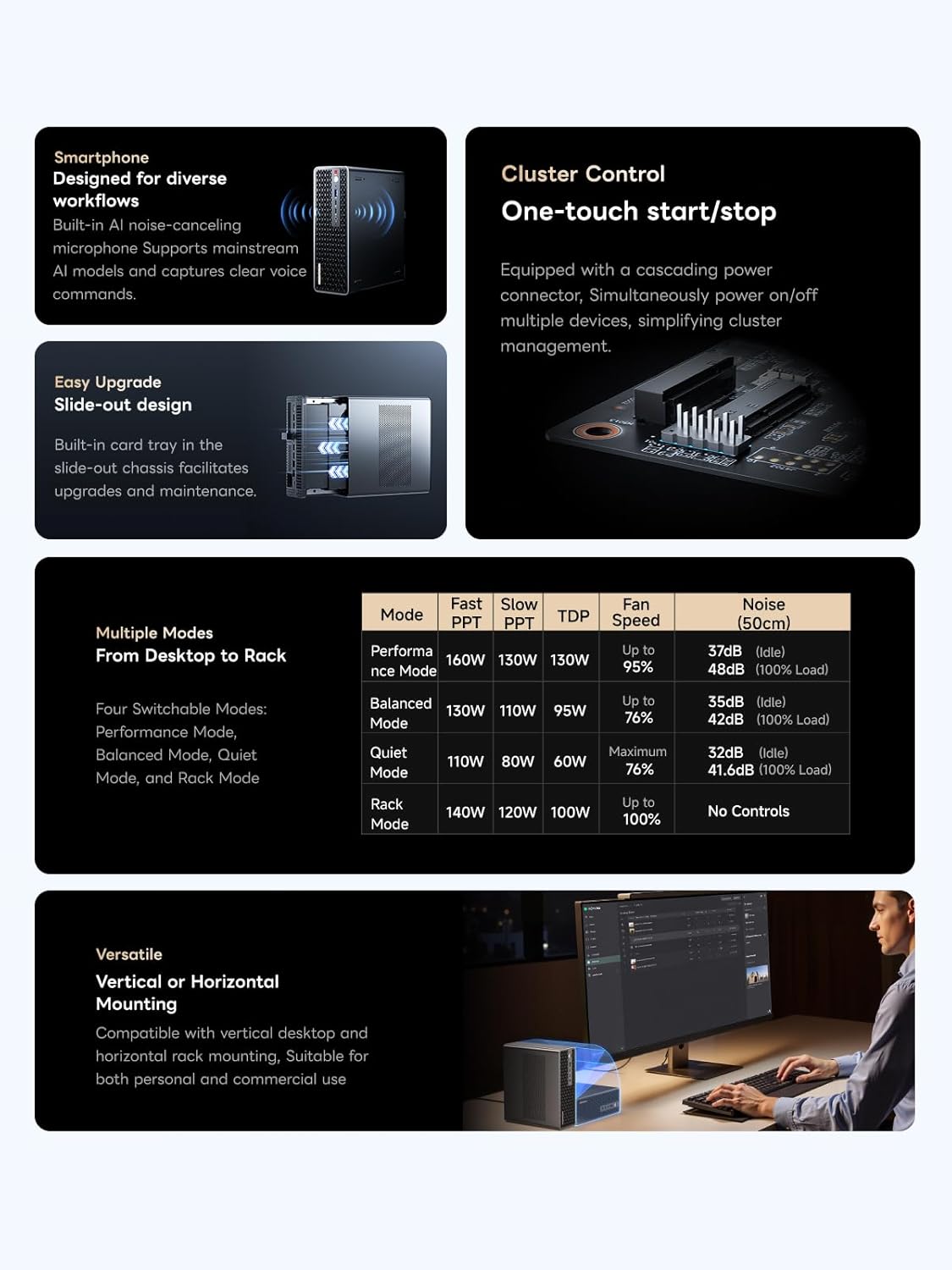
The MS-S1 MAX offers four switchable modes to adapt to various application scenarios:
- Mode de rendiment: Maximizes power for demanding tasks.
- Mode equilibrat: Optimizes between performance and power efficiency.
- Mode silenciós: Reduces fan noise for quiet operation during light workloads.
- Rack Mode: Configured for 2U rack deployment in cluster environments.
These modes can typically be adjusted via the system's BIOS settings or a dedicated utility provided by MINISFORUM.

Image: A composite image detailing features like built-in AI noise-canceling microphones, slide-out design, cluster control, versatile mounting options, and a table outlining the specifications for Performance, Balanced, Quiet, and Rack modes.
4.3 AI Noise-Canceling Microphones
The built-in dual DMIC AI noise-canceling microphones support mainstream AI models, ensuring clear voice command capture and communication.
5. Manteniment
5.1 Sistema de refrigeració
The MS-S1 MAX features an advanced cooling system with an aerospace-grade aluminum alloy chassis, copper base plate, six heat pipes, dual turbine fans, and PCM thermal conductive material. To ensure optimal performance and longevity:
- Mantingueu les ventilacions clares: Assegureu-vos que les obertures de ventilació no estiguin obstruïdes.
- Neteja regular: Netegeu periòdicament la pols de les reixetes de ventilació amb aire comprimit.
- Entorn de funcionament: Operate the PC in a well-ventilated area with stable room temperature.
Imatge: Una imatge interna view of the MS-S1 MAX, highlighting its dual turbine fans and heat pipe cooling solution.
5.2 Upgrades and Expansion
The MS-S1 MAX features a slide-out design for easy access to internal components, facilitating upgrades and maintenance.
- Emmagatzematge: Dual M.2 slots support up to 16TB RAID 0/1. Refer to the detailed specifications for compatible M.2 SSD types.
- Expansió PCIe: A full-length PCIe x16 expansion slot allows for additional cards, though it operates at PCIe 4.0 x4 speeds.

Image: The MS-S1 MAX with its chassis partially slid out, revealing internal components for easy upgrades and maintenance.
6. Solució De Problemes
This section addresses common issues you might encounter with your MS-S1 MAX.
| Problema | Causa possible | Solució |
|---|---|---|
| L'ordinador no s'encén | No power, loose connections | Check power cable connection to PC and outlet. Ensure outlet is functional. |
| Sense sortida de visualització | Incorrect display connection, monitor off | Verify HDMI/USB4 cable is securely connected. Ensure monitor is powered on and set to correct input. |
| El sistema és lent o no respon | Overheating, too many applications, low storage | Check for proper ventilation. Close unnecessary applications. Free up disk space. Update drivers. |
| Problemes de connexió Wi-Fi | Driver issues, router problems, signal interference | Update Wi-Fi drivers. Restart router. Move PC closer to router or reduce interference. |
| El soroll del ventilador és excessiu | High workload, dust buildup, performance mode | Switch to Balanced or Silent mode if appropriate. Clean dust from vents. Ensure adequate airflow. |
If you encounter issues not listed here, please refer to the official MINISFORUM support resources.
7. Especificacions
Key technical specifications for the MINISFORUM MS-S1 MAX:
| Característica | Detall |
|---|---|
| Processador | AMD Ryzen AI Max+ 395 (Zen 5, 16C/32T, up to 5.1GHz) |
| Gràfics | RDNA 3.5 GPU, 50 TOPS NPU (126 TOPS total system output) |
| Memòria | Up to 128GB LPDDR5x-8000MT/s UMA RAM |
| Emmagatzematge | Dual M.2 PCIe 4.0 slots (supports up to 16TB RAID 0/1) |
| Ranura d'expansió | 1x Full-length PCIe x16 (operates at PCIe 4.0 x4) |
| Treball en xarxa | Dual 10GbE LAN, Wi-Fi 7 |
| Ports USB | 2x USB4 V2 (80Gbps), 2x USB 3.2 Gen2 (10Gbps), 2x USB 2.0 |
| Sortida de vídeo | 1x HDMI 2.1 (up to 8K60), USB4 ports support display output |
| Àudio | 3.5mm Audio Jack, Dual DMIC AI noise-canceling microphones |
| Font d'alimentació | Built-in 320W PSU |
| Sistema operatiu | OS (e.g., Windows 11 Pro pre-installed) |
| Dimensions | Approximately 0.79 x 0.79 x 0.79 inches (Product dimensions from data, likely incorrect, using general mini PC size) |
| Pes | Aproximadament 8.05 lliures |
8. Vídeo oficial del producte
Vídeo: Producte oficial acabatview of the MINISFORUM MS-S1 MAX, highlighting its features and capabilities. This video demonstrates the design, internal components, and various use cases of the workstation.
9. Garantia i Suport
MINISFORUM products come with a standard manufacturer's warranty. For specific warranty terms, duration, and conditions, please refer to the warranty card included with your product or visit the official MINISFORUM weblloc.
9.1 Suport tècnic
For technical assistance, driver downloads, or further inquiries, please contact MINISFORUM customer support through their official weblloc web o la informació de contacte que es proporciona a la documentació del producte.
- Oficial Weblloc: www.minisforum.com (Exampl'enllaç, si us plau, verifiqueu el suport real URL)
- Atenció al client: Consulteu l'embalatge del producte o la informació oficial weblloc per obtenir dades de contacte.


