Introducció
The FiiO DM15 R2R is a portable HiFi-grade CD player designed for high-fidelity audio playback. It features FiiO’s self-developed fully differential 24-bit R2R resistor array DAC, delivering authentic analog sound. The DM15 R2R offers substantial power output, aptX Adaptive Bluetooth transmission, and functions as a high-resolution USB sound card. With customizable sound presets and USB ripping capabilities, it provides a versatile listening experience.
Característiques clau
- Fully Differential 24-Bit R2R DAC: Utilizes 192 high-precision resistors for warm, natural, and detailed analog sound.
- Sortida d'alta potència: Delivers up to 1150mW + 1150mW per channel balanced output, capable of driving demanding headphones.
- Qualcomm QCC3095 Bluetooth: Supports aptX, aptX HD, aptX Adaptive, and SBC for high-quality wireless audio transmission from CD or USB input.
- HiFi-Grade USB DAC: Functions as a USB sound card supporting up to 384kHz/32bit PCM and DSD256, offering rich analog musicality.
- 24 Sound Presets with Global BASS + EQ: Característiques 3-stage BASS boost and 8 built-in EQ presets, including a RETRO mode, for tailored sound.
- USB Ripping Functionality: Supports 31-band high-precision PEQ for fine-tuned sound customization and direct ripping of CDs.
Configuració
1. Càrrega del dispositiu
The FiiO DM15 includes a nonstandard battery. Connect the device to a power source using the provided USB cable. A green light indicates charging, and the light will change when fully charged.
2. Inserció d'un CD
Gently open the CD compartment. Place the CD onto the spindle with the label side facing up. Close the compartment securely.
3. Connexió de la sortida d'àudio
- Auriculars: Connect 3.5mm or 4.4mm headphones to the respective jacks on the device.
- Bluetooth: Pair with Bluetooth headphones or speakers via the device's Bluetooth settings.
- External DAC/Ampmés viu: Use the Optical/Coaxial digital output or RCA output to connect to an external audio system.
- Mode DAC USB: Connect the DM15 to a computer or compatible phone/tablet via USB to use it as an external DAC. Ensure proper recognition by connecting the device first, then plugging in USB power.

Image: FiiO DM15 connectivity diagram illustrating various input and output options, including USB, analog, Bluetooth, and digital connections.
Instruccions de funcionament
1. Power On/Off and Status Check
- Encès/apagat: Long press the Power button to turn the device on or off.
- Comprova l'estat: Short press the Power button while the device is on to check battery level and operational status.
2. Controls de reproducció
- Reproduir/pausa: Premeu el botó Reproduir/Pausa per iniciar o aturar la reproducció.
- Omet les pistes: During playback, use the Rewind and Fast-Forward buttons to skip backward or forward through tracks.
- Ajust de volum: Use the Volume Up (+) and Volume Down (-) buttons for step-by-step volume changes. Long press for quick volume adjustment.
3. Switching Output Modes
Short press the Power button repeatedly to cycle through output modes:
- SORTIDA USB: For CD ripping or PC recording.
- SORTIDA SPDIF: For Optical or Coaxial digital output.
- BLUE OUT: For Bluetooth output.
- PRE SORTIDA: For Analog output.
4. Emparellament Bluetooth
In Bluetooth mode, long press the Rewind or Fast-Forward buttons to force pairing or clear existing pairings. Ensure the receiving device's Bluetooth codec is set correctly.
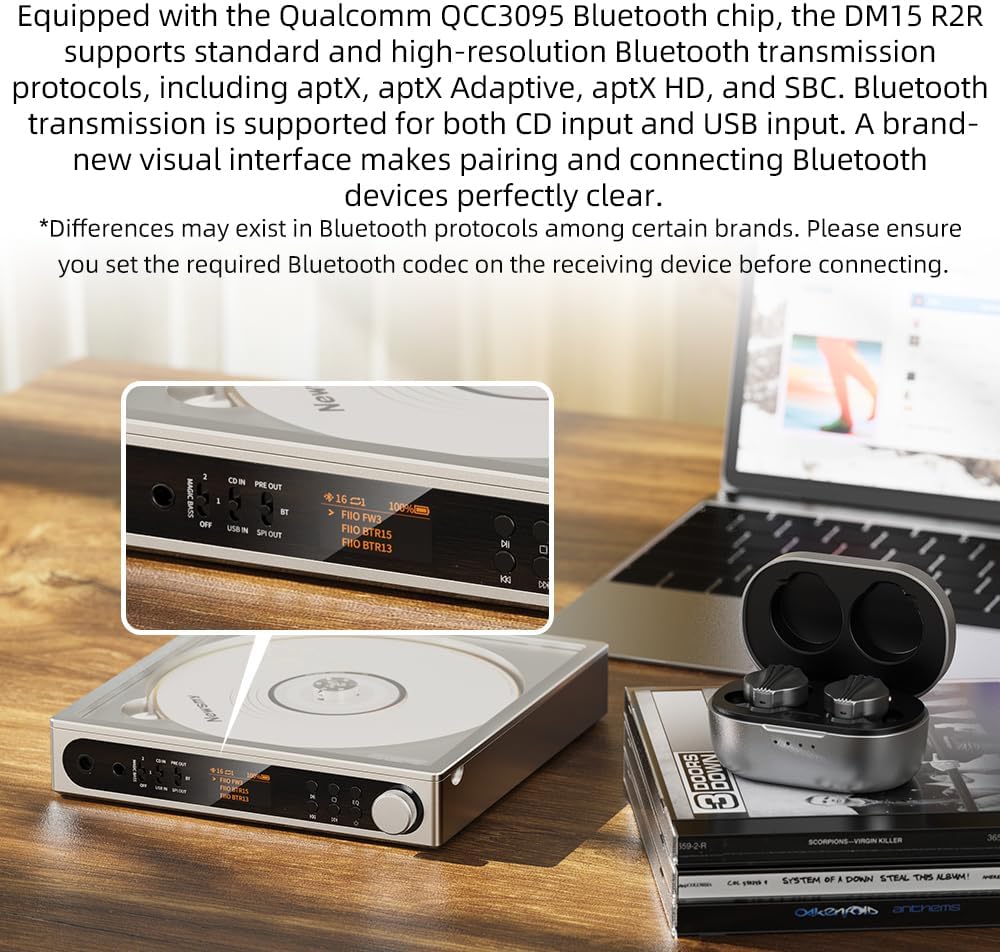
Image: FiiO DM15 showing Bluetooth connectivity on its display, ready to pair with wireless earbuds.
5. Personalització del so
Use the Multifunction button to select playback modes (e.g., repeat, random). Short press to cycle through options. Long press to add the current track to 'My Favorites'.

Image: FiiO DM15's display showing various EQ presets and BASS boost options for personalized audio.
6. USB Ripping
Connect a USB drive to the device. In USB OUT mode, the DM15 supports CD ripping, allowing you to transfer audio from CDs to the connected USB storage.
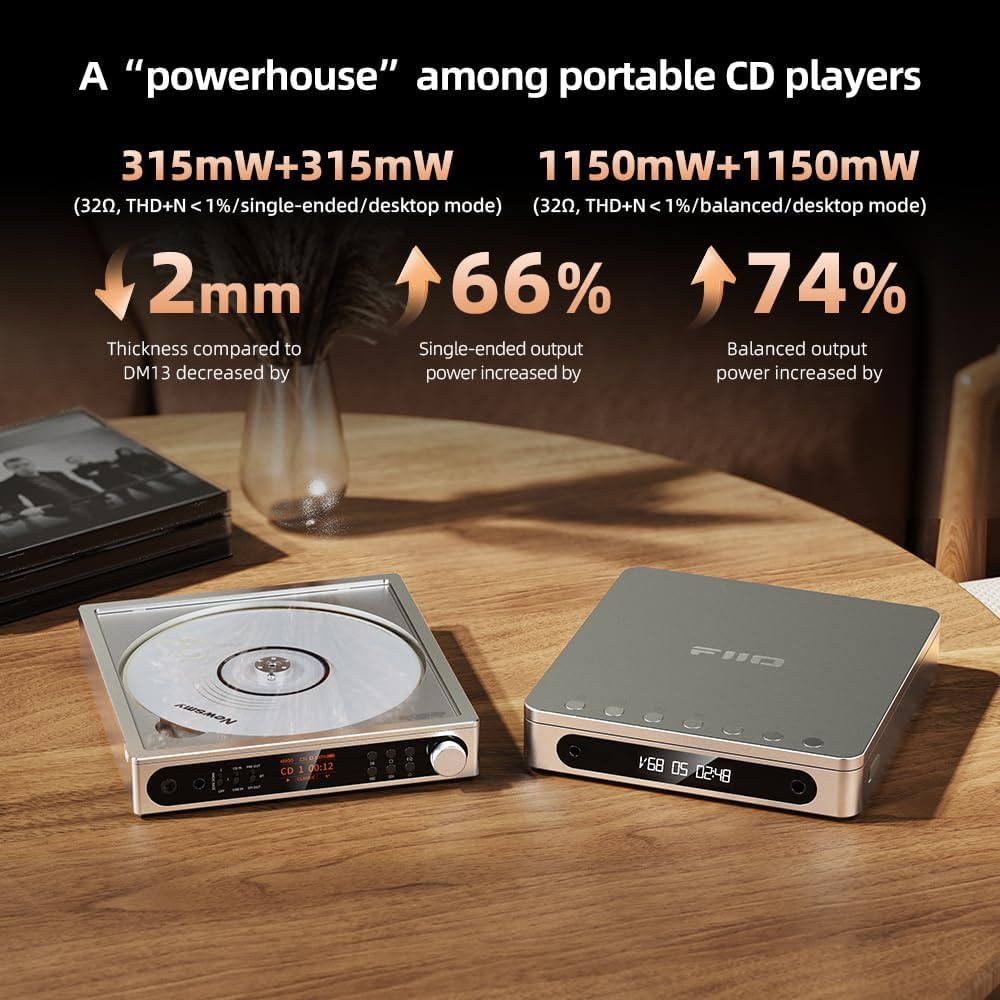
Image: FiiO DM15 demonstrating USB ripping, connected to an external USB hub for data transfer.
Manteniment
- Mantingueu el dispositiu net netejant-lo amb un drap suau i sec.
- Eviteu exposar el dispositiu a temperatures extremes, humitat o llum solar directa.
- Handle CDs by the edges to prevent scratches and smudges.
- Guardeu el dispositiu en un lloc segur quan no l'utilitzeu per evitar danys.
Resolució de problemes
- El dispositiu no s'encén: Ensure the battery is charged or the device is connected to a stable power source.
- Sense so: Check headphone connections, volume levels, and selected output mode. Verify Bluetooth pairing if applicable.
- CD not playing: Ensure the CD is clean, free of scratches, and correctly inserted.
- Problemes de connexió Bluetooth: Try clearing previous pairings and re-pairing the device. Ensure the Bluetooth device is within range.
Especificacions
| Característica | Detall |
|---|---|
| Dimensions del producte | 5.39 x 5.67 x 1 polzades |
| Pes de l'article | 1.04 lliures |
| Número de model de l'article | DM15-R2R-Black |
| Bateries | 1 bateria no estàndard (inclosa) |
| Tecnologia de connectivitat | Bluetooth, USB |
| Components inclosos | Cable |
| Nombre de discs | 1 |

Image: FiiO DM15 highlighting its high-voltage lithium battery power for portable use.
Garantia i Suport
For warranty information, technical support, or service inquiries, please refer to the documentation included with your product or visit the official FiiO weblloc. Conserveu el rebut de compra per a reclamacions de garantia.


