Introducció
This manual provides detailed instructions for the use and maintenance of your GOBOULT Raven True Wireless Stereo (TWS) Earbuds. Please read this manual thoroughly before using the product to ensure proper operation and to maximize your listening experience.

Imatge: Més deview of GOBOULT Raven TWS Earbuds showcasing main features like 70 hours playtime, app support, dual device pairing, 10mm drivers, quad mic environmental noise cancellation, and available color options.
Què hi ha a la caixa
Your GOBOULT Raven TWS Earbuds package includes the following items:
- GOBOULT Raven TWS Earbuds (Left and Right)
- Estoig de càrrega
- Cable de càrrega USB
- Múltiples mides de puntes d'orella
- Manual d'usuari (aquest document)
- Targeta de garantia
Producte acabatview
The GOBOULT Raven TWS Earbuds are designed for comfort and high-quality audio. Familiarize yourself with the components:
- Auriculars: Left (L) and Right (R) earbuds with touch control areas and microphones.
- Estoig de càrrega: Stores and charges the earbuds. Features a USB Type-C charging port.
- Indicadors LED: On both earbuds and the charging case, indicating battery status, charging, and pairing mode.
- Micròfons: Quad microphones for Environmental Noise Cancellation (ENC) during calls.

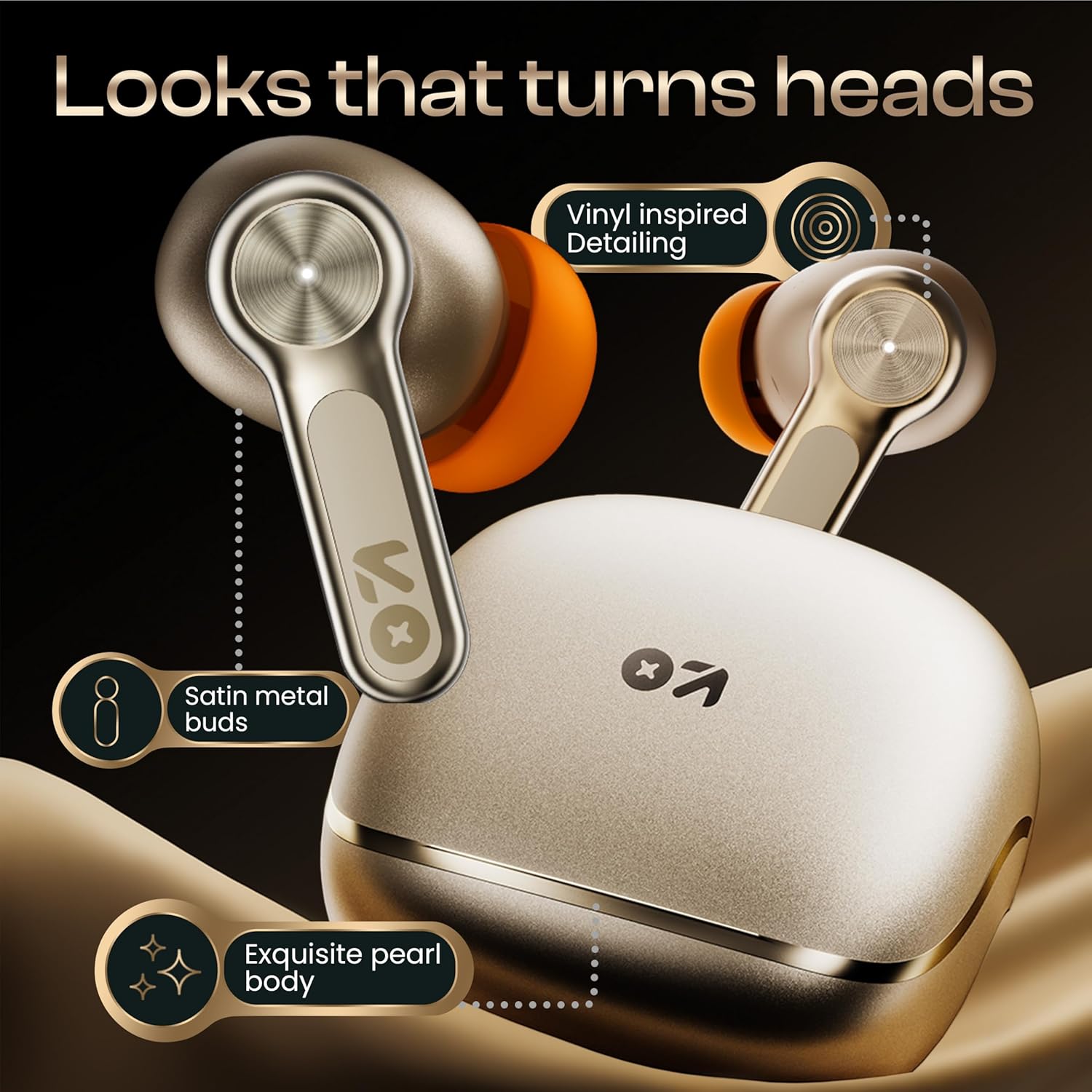
Imatge: Detallada view of the GOBOULT Raven earbuds and their charging case, showcasing the satin metal finish and exquisite pearl body design.
Configuració
1. Càrrega inicial
Abans del primer ús, carregueu completament els auriculars i l'estoig de càrrega.
- Col·loqueu els dos auriculars a la caixa de càrrega.
- Connecteu el cable de càrrega USB tipus C al port de càrrega de la carcassa i a una font d'alimentació.
- L'indicador LED de la carcassa mostrarà l'estat de càrrega. Un cop carregada completament, l'indicador canviarà o s'apagarà.
A 10-minute charge provides approximately 120 minutes of playtime.

Image: The GOBOULT Raven earbuds being charged in their case, highlighting the impressive 70-hour total battery life and the quick charge capability (10 mins charge for 120 mins playtime).
2. Vinculació amb un dispositiu
The earbuds use Bluetooth 5.4 for stable and quick connections.
- Open the charging case. The earbuds will automatically enter pairing mode (LED indicators will flash).
- Al dispositiu (telèfon intel·ligent, tauleta, ordinador portàtil), activeu el Bluetooth.
- Cerca "GOBOULT Raven" in the list of available Bluetooth devices and select it to connect.
- Un cop connectats, els indicadors LED dels auriculars deixaran de parpellejar.
The earbuds feature Blink&Pair™ technology for instant pairing after the initial setup.

Image: The GOBOULT Raven earbuds and case, emphasizing the upgraded Bluetooth v5.4 for instant pairing and reliable connection, along with support for SBC and AAC audio codecs.
3. GOBOULT App Installation
For enhanced customization and control, download the GOBOULT App from your device's app store.
- Cerca "GOBOULT" in the App Store (iOS) or Google Play Store (Android).
- Install the app and follow the on-screen instructions to connect your Raven earbuds.
- The app allows you to customize sound profiles (EQ modes), control features, and manage touch controls.

Image: A smartphone screen displaying the GOBOULT Amp APP, illustrating features like equalizer customization, custom touch controls, gaming mode activation, and widget support for a personalized audio experience.
Instruccions de funcionament
Controls tàctils
The GOBOULT Raven earbuds feature intuitive touch controls on each earbud. The specific functions can often be customized via the GOBOULT App.
| Acció | Funció |
|---|---|
| Toc únic (E/D) | Reproduir/Pausar música, Respondre/Finalitzar trucada |
| Doble Toc (L) | Pista anterior |
| Doble toc (R) | Pista següent |
| Triple Toc (E/D) | Activa l'Assistent de veu |
| Premda llarga (E/D) | Reject Call, Toggle Gaming Mode (customizable) |
Note: These are typical touch control functions. Refer to the GOBOULT App for exact and customizable controls.
Imatge: Una imatge detallada view of the GOBOULT Raven earbud's touch-sensitive surface, indicating areas for music playback control and call management.
Vinculació de dos dispositius
The earbuds can connect to two devices simultaneously, allowing seamless switching between them.
- Pair the earbuds with your first device (e.g., smartphone) as described in the "Pairing with a Device" section.
- Disconnect Bluetooth on the first device or put the earbuds back in the case and close it, then open it again to re-enter pairing mode.
- Emparella els auriculars amb el teu segon dispositiu (per exemple, un ordinador portàtil).
- Reconnect the earbuds to the first device via its Bluetooth settings. The earbuds should now be connected to both.
L'àudio canviarà automàticament al dispositiu que reprodueix contingut o rep una trucada.

Image: The GOBOULT Raven earbuds and their case positioned between a smartphone and a laptop, demonstrating the dual device pairing feature for seamless switching between audio sources.
Mode de joc (latència ultrabaixa)
Activate Gaming Mode for a 50ms ultra-low latency experience, ideal for gaming and video playback.
- Gaming Mode can typically be activated via a specific touch control gesture (refer to your GOBOULT App settings or the table above).
- You can also enable/disable Gaming Mode through the GOBOULT App.

Image: The GOBOULT Raven earbuds and their charging case next to a gaming controller, emphasizing the Combat™ Gaming Mode with 50ms ultra-low latency for an optimized gaming experience.
Assistent de veu
Access your device's voice assistant (Google Assistant, Siri) directly from the earbuds.
- Perform the designated touch control gesture (e.g., triple tap) to activate the voice assistant.
- Speak your command after the prompt.

Image: A composite image illustrating the Smart AI Voice Assistance feature, showing integration with "Ok Google" and "Hey Siri", alongside the IPX5 water-resistant rating of the earbuds.
Manteniment
Neteja
- Netegeu regularment els auriculars i l'estoig de càrrega amb un drap suau, sec i sense borrissol.
- Traieu les puntes de les orelles i netegeu qualsevol cerumen o restes dels broquets dels auriculars amb un raspall petit o un bastonet de cotó.
- Assegureu-vos que els contactes de càrrega dels auriculars i de la funda estiguin nets i secs.
Resistència a l'aigua (IPX5)
The GOBOULT Raven earbuds are IPX5 water-resistant, meaning they can withstand sweat and light rain. They are not designed for submersion in water.
- Do not expose the earbuds to running water or submerge them.
- If they get wet, wipe them dry thoroughly before placing them back in the charging case.
Emmagatzematge
Guardeu els auriculars a la funda de càrrega quan no els feu servir per protegir-los i mantenir-los carregats.
- Eviteu l'emmagatzematge a temperatures extremes o humitat elevada.
Resolució de problemes
| Problema | Possible solució |
|---|---|
| Els auriculars no s'aparellen |
|
| Només funciona un auricular |
|
| Mala qualitat del so |
|
| Problemes de càrrega |
|
Especificacions
| Característica | Detall |
|---|---|
| Nom del model | Raven (Airbass Earbuds) |
| Connectivitat | Bluetooth v5.4 |
| abast sense fils | Fins a 10 metres |
| Controladors d'àudio | Controladors dinàmics de 10 mm |
| Hora de joc | Fins a 70 hores (amb estoig de càrrega) |
| Temps de càrrega | Approx. 20 minutes (for quick charge) |
| Latència d'àudio | 50ms (Gaming Mode) / 45ms (as per spec) |
| Micròfons | Quad Mic amb cancel·lació de soroll ambiental (ENC) |
| Resistència a l'aigua | IPX5 |
| Mètode de control | Toc, veu |
| Característiques especials | Dual Device Pairing, GOBOULT App Support, Smart AI Voice Assistance |
| Resposta de freqüència | 20 Hz (lower bound) |
| Sensibilitat | 115 dB |
| Interfície del maquinari | USB tipus C |
| Dimensions del producte | 5 x 4.5 x 5.4 cm |
| Pes de l'article | 600 g (pes del paquet) |
Nota: les especificacions estan subjectes a canvis sense previ avís.
Garantia i Suport
Informació de la garantia
Your GOBOULT Raven TWS Earbuds come with a Garantia del fabricant de 1 anys from the date of purchase. This warranty covers manufacturing defects and ensures trusted performance and premium build quality.
- Please retain your purchase receipt and the warranty card for warranty claims.
- La garantia no cobreix els danys causats per mal ús, accidents, modificacions no autoritzades o desgast normal.
Atenció al client
For any queries, technical assistance, or warranty claims, please contact GOBOULT customer support. Refer to the contact information provided on your warranty card or visit the official GOBOULT weblloc per obtenir detalls de suport.
Fabricant: GOBOULT, B-67 Wazirpur Industrial Area, New Delhi 110052, India