1. Introducció
This manual provides essential instructions for the safe and effective operation of your Genérico WRJ-12619 Professional HD Camera Drone. This rechargeable drone with an HD camera is designed for capturing impressive aerial images and videos. It features a high-definition camera for clear footage, a rechargeable battery system for convenience, and a responsive control system for stable flight. Please read this manual thoroughly before operating the drone to ensure proper usage and to prevent damage or injury.
2. Pautes de seguretat
- Always operate the drone in open areas, away from people, animals, buildings, and obstacles.
- No voli a prop d'aeroports o espais aeris restringits.
- Eviteu volar amb vents forts o condicions meteorològiques adverses.
- Assegureu-vos que la bateria estigui completament carregada abans de cada vol.
- Mantingueu els dits i la roba solta allunyats de les hèlixs giratòries.
- Supervise children during drone operation.
- No modifiqueu el dron ni els seus components.
- Always turn off the drone and controller when not in use.
3. Contingut del paquet
Verifiqueu que tots els elements siguin presents al vostre paquet:
- WRJ-12619 HD Camera Drone
- Control remot
- Piles recarregables (2 incloses)
- Cable de càrrega USB
- Hélices de recanvi
- Guàrdies d'hèlix
- Tornavís
- Manual d'usuari (aquest document)

Image: All components of the Genérico WRJ-12619 drone package, including the drone, remote controller, batteries, and accessories.
4. Producte acabatview
4.1 Components del dron
The WRJ-12619 drone features a compact, foldable design for portability, equipped with a front-facing HD camera and LED lights for visibility.

Image: The Genérico WRJ-12619 drone in its unfolded state, showcasing the camera, propellers, and LED lights, alongside the remote controller with a smartphone mounted.
4.2 Control remot
The remote controller provides intuitive control over the drone's flight and camera functions. It includes joysticks for movement, buttons for special functions, and a mount for your smartphone to view l'alimentació de la càmera en directe.
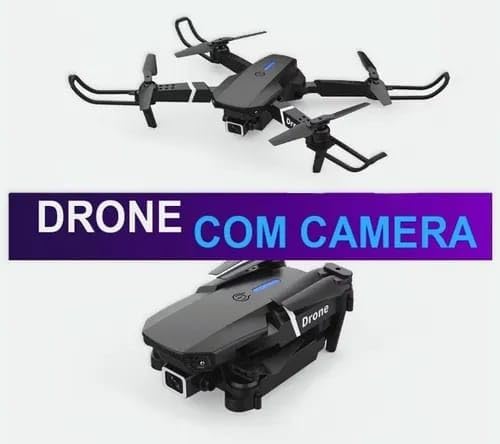
Image: The Genérico WRJ-12619 drone shown in both its compact, folded configuration and its ready-to-fly, unfolded configuration, highlighting its portability.
5. Configuració
5.1 Càrrega de la bateria
- Traieu la bateria del dron.
- Connecteu el cable de càrrega USB a la bateria i a un adaptador de corrent USB adequat (no inclòs).
- The indicator light on the charging cable will show the charging status. Refer to the battery's specific instructions for full charge indication.
- Charging typically takes 60-90 minutes. Do not overcharge.
5.2 Configuració del comandament a distància
- Obriu el compartiment de la bateria a la part posterior del comandament a distància.
- Insert the required batteries (usually AA, not included) according to the polarity markings.
- Tanqueu el compartiment de la bateria de manera segura.
5.3 Preparació del dron
- Desplegueu els braços del dron amb cura fins que encaixin al seu lloc.
- Attach the propeller guards by snapping them onto the drone's motor arms.
- Insert the fully charged drone battery into the battery compartment on the drone until it is securely seated.

Image: The Genérico WRJ-12619 drone being held in a person's hand, illustrating its compact size and portability when unfolded.
6. Instruccions de funcionament
6.1 Pairing the Drone and Controller
- Col·loqueu el drone sobre una superfície plana i plana.
- Engegueu el dron prement el botó d'engegada. Els llums indicadors del dron parpellejaran.
- Enceneu el comandament a distància.
- Empenyeu el joystick esquerre (accelerador) completament amunt i després completament avall. Els llums del dron deixaran de parpellejar i romandran fixos, cosa que indica que l'aparellament s'ha realitzat correctament.
6.2 Enlairament i aterratge
- Enlairament amb una sola clau: After pairing, press the one-key takeoff button (usually indicated by an arrow pointing up). The drone will automatically ascend to a stable hovering height.
- Enlairament manual: After pairing, push both joysticks down and outwards simultaneously to start the propellers. Then, gently push the left joystick (throttle) upwards to ascend.
- Aterratge d'una sola clau: Press the one-key landing button (usually indicated by an arrow pointing down). The drone will automatically descend and land.
- Aterratge manual: Gently pull the left joystick (throttle) downwards until the drone lands. Once landed, pull both joysticks down and inwards to stop the propellers.
6.3 Controls de vol
- Joystick esquerre (accelerador/guinyada): Up/Down controls altitude. Left/Right controls rotation (yaw).
- Joystick dret (Pitch/Roll): Up/Down controls forward/backward movement (pitch). Left/Right controls sideways movement (roll).
6.4 Funcionament de la càmera
To use the HD camera, download the dedicated drone app on your smartphone and connect to the drone's Wi-Fi network. The app will provide a live feed and controls for recording video and taking photos.
- Fent fotos: Premeu el botó de foto del comandament a distància o de l'aplicació.
- Gravació de vídeo: Press the video button on the remote controller or in the app to start/stop recording.
6.5 Característiques especials
- Retorn automàtic: Press the Return to Home (RTH) button. The drone will attempt to fly back to its takeoff point. Ensure a clear path for RTH.
- Stabilized Flight: The drone features a stabilized flight system for easier control and smoother aerial footage.
7. Manteniment
7.1 Neteja
Wipe the drone and controller with a soft, dry cloth. Do not use harsh chemicals or solvents. Keep the camera lens clean for optimal image quality.
7.2 Substitució de l'hèlix
If a propeller is damaged, replace it with a spare propeller from the package. Use the included screwdriver to remove the screw holding the damaged propeller and install the new one, ensuring it is securely fastened.
7.3 Cura de la bateria
- Guardeu les piles en un lloc fresc i sec.
- No exposeu les piles a temperatures extremes.
- If not using the drone for an extended period, charge the batteries to approximately 50% before storage.
8. Solució De Problemes
- El dron no s'encén: Assegureu-vos que la bateria estigui completament carregada i inserida correctament.
- El controlador no es connecta: Ensure controller batteries are fresh and correctly inserted. Re-attempt the pairing process.
- Dron inestable durant el vol: Perform a gyroscope calibration (refer to specific instructions in the app or quick start guide if available). Check for damaged propellers.
- Poor camera quality/no live feed: Ensure your smartphone is correctly connected to the drone's Wi-Fi network. Clean the camera lens.
- Temps de vol curt: Battery may not be fully charged, or it may be nearing the end of its lifespan.
9. Especificacions
| Característica | Detall |
|---|---|
| Nom del model | WRJ-12619 |
| Marca | Genérico |
| Resolució de vídeo | 1280x720, 720p HD |
| Característiques especials | Rechargeable Battery, Remote Control, HD Camera, Automatic Return, Stabilized Flight |
| Tecnologia de connectivitat | Bluetooth, WiFi |
| Tipus de bateria | Lithium-ion (2 non-standard batteries included) |
| Material | Electronic Components, ABS Plastic |
| Color | Negre |
| Dimensions del producte | 25 x 15 x 5 cm |
| Pes del producte | 350 g |
10. Garantia i Suport
For warranty information or technical support, please refer to the retailer or manufacturer's contact details provided at the point of purchase. Keep your proof of purchase for any warranty claims.


