1. Informació de seguretat
Si us plau, llegiu atentament totes les instruccions de seguretat abans d'utilitzar aquest producte. Conserveu aquest manual per a futures consultes.
- Seguretat elèctrica: Do not expose this appliance to rain or moisture to reduce the risk of fire or electric shock. Ensure the power adapter is connected to a suitable power source.
- Ventilació: No bloquegeu cap obertura de ventilació. Instal·leu-ho d'acord amb les instruccions del fabricant.
- Calor: No instal·leu a prop de cap font de calor com ara radiadors, registres de calor, estufes o altres aparells (inclosos amplificadors) que produeixen calor.
- Neteja: Netegeu només amb un drap sec.
- Manteniment: No intenteu atendre aquest producte vosaltres mateixos. Consulteu tots els serveis a personal de servei qualificat.
2. Contingut del paquet
Verifiqueu que tots els elements que s'enumeren a continuació s'inclouen al vostre paquet:
- 1 x ULTIMEA Poseidon M20 Pro Soundbar
- 1 x Adaptador de corrent per a barra de so
- 1 comandament a distància (piles no incloses)
- 1 x Manual d'usuari
- 1 x Stereo 3.5mm to 3.5mm Audio Cable (1.5m AUX Cable)
- 1 x Cable òptic digital (1.5 m)
- 4 x Kit de muntatge a la paret
- 2 x suport de paret
- 2 x Cargol de muntatge als altaveus

Figure 2.1: Included accessories and cables.
3. Producte acabatview
The ULTIMEA Poseidon M20 Pro is a 2.1ch surround sound bar designed to enhance your audio experience with powerful sound and versatile features.
3.1 All-In-One Design
This soundbar features built-in dual speakers, a 3-inch subwoofer, and side-firing bass ports to deliver deeper lows and expanded surround effects. It offers a 2.1 channel sound experience with 132W peak power.

Figure 3.1: All-in-one soundbar design.
3.2 Tecnologia BassMX
Ultimea's exclusive BassMX technology enhances low frequencies with adjustable bass, providing a powerful sound experience from a compact size.
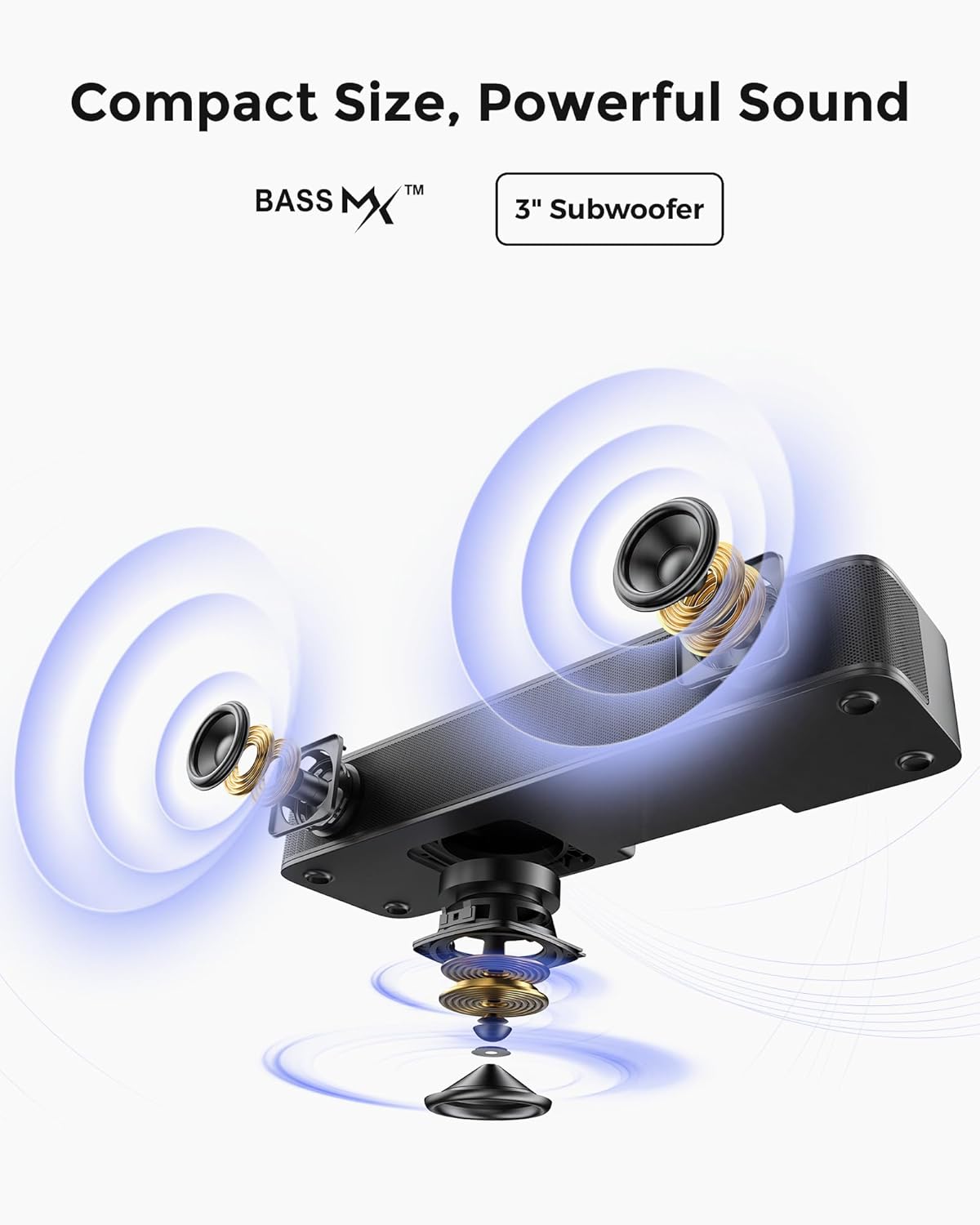
Figure 3.2: BassMX technology for enhanced bass.
3.3 VoiceMX for Crystal-Clear Dialogue
VoiceMX technology dynamically optimizes speech frequencies in real-time, ensuring crystal-clear dialogue in all content.

Figure 3.3: VoiceMX for enhanced vocal clarity.
3.4 Compact Size & Flexible Placement
The compact design allows for versatile placement options, including on a stand, cabinet, under the TV, or wall-mounted.

Figure 3.4: Flexible placement options for the soundbar.
3.5 Opcions de connectivitat
The soundbar supports multiple input options including Optical, AUX, Bluetooth 5.4, and USB. An additional "SUB OUT" port is available for connecting an external active subwoofer (not included).

Figura 3.5: Ports de connectivitat del panell posterior.
4. Configuració
4.1 Col·locació
Position the soundbar centrally in front of your TV or mount it on the wall using the provided wall mount kit. Ensure there is adequate space for ventilation.
4.2 Connexió d'alimentació
- Connect the power adapter to the 'DC IN' port on the back of the soundbar.
- Connecteu l'altre extrem de l'adaptador d'alimentació a una presa de corrent.
4.3 Connexió al televisor
Trieu un dels mètodes de connexió següents:
4.3.1 Connexió òptica (recomanat)
- Remove the protective caps from both ends of the Digital Optical Cable.
- Insert one end of the optical cable into the 'OPTICAL' port on your TV.
- Insert the other end into the 'OPTICAL' port on the soundbar.
- On the soundbar remote, press the 'OPT' button to select the Optical input.

Figure 4.1: Optical connection diagram.
4.3.2 Connexió AUX
- Connect one end of the 3.5mm AUX cable to the 'AUX' output port on your TV.
- Connect the other end to the 'AUX' input port on the soundbar.
- On the soundbar remote, press the 'AUX' button to select the AUX input.

Figure 4.2: AUX connection diagram.
4.3.3 Connexió Bluetooth
- On the soundbar remote, press the 'BT' button to enter Bluetooth pairing mode. The indicator light will blink blue.
- Enable Bluetooth on your TV or mobile device and search for 'Poseidon M20 Pro'.
- Select 'Poseidon M20 Pro' to pair. The indicator light will turn solid blue once connected.

Figure 4.3: Bluetooth connection diagram.
4.4 Vídeo instructiu
Video 4.1: Detailed instructional video for setting up the Poseidon M20 Pro soundbar, including unboxing and connection steps.
5. Instruccions de funcionament
5.1 Soundbar Controls
The soundbar can be controlled using the touch buttons on its top panel or the included remote control.
- Botó d'encesa: Activa/desactiva la barra de so.
- Botó d'entrada: Cycles through input sources (Optical, AUX, Bluetooth, USB).
- Botons de volum (+/-): Ajusta el nivell de volum.
- Botó Bluetooth: Entra en el mode d'emparellament Bluetooth.
5.2 Using the ULTIMEA Smart App
Download the ULTIMEA Smart App to access advanced control features and customization options for your soundbar.

Figure 5.1: ULTIMEA Smart App interface.
5.2.1 Configuració de l'equalitzador de 10 bandes
The app allows you to fine-tune your audio with a 10-band equalizer. Adjust frequencies to match your personal taste and environment.

Figure 5.2: Detailed 10-band equalizer settings in the app.
5.2.2 Preset EQ Matrices & Modes
Access 121 preset equalizer matrices tailored for distinct sonic preferences (Bass, Pop, Classical, Rock) and 6 tailored EQ modes (Movie, Music, Voice, Sport, Game, Night) for quick sound optimization.
6. Manteniment
Per garantir la longevitat i el rendiment òptim de la barra de so, seguiu aquestes pautes de manteniment:
- Neteja: Feu servir un drap suau i sec per netejar la superfície de la barra de so. No utilitzeu netejadors líquids ni aerosols.
- Ventilació: Mantingueu les obertures de ventilació netes de pols i deixalles.
- Emmagatzematge: If storing the soundbar for an extended period, unplug it from the power source and store it in a cool, dry place.
7. Solució De Problemes
Si teniu problemes amb la barra de so, consulteu els passos habituals següents per a la resolució de problemes:
7.1 No Sound After Connection
- Comproveu la font d'entrada: Ensure the correct input source (Optical, AUX, Bluetooth) is selected on the soundbar using the remote control or the soundbar's input button.
- Comproveu les connexions dels cables: Verify that all audio cables are securely connected to both the soundbar and your TV.
- TV Audio Output Settings: Access your TV's audio settings and ensure the audio output is set to the correct external device (e.g., Optical Out, AUX Out, or Bluetooth Speaker). Many TVs require setting the Digital Audio Output Format to 'PCM' for optical connections.
- Nivells de volum: Augmenta el volum tant a la barra de so com al televisor.
- Cicle d'alimentació: Turn off both the TV and the soundbar, unplug them from the power outlet, wait a few minutes, then plug them back in and power them on.
7.2 Problemes d'emparellament Bluetooth
- Soundbar in Pairing Mode: Ensure the soundbar is in Bluetooth pairing mode (blinking blue indicator light).
- Bluetooth del dispositiu activat: Confirm Bluetooth is enabled on your TV or mobile device.
- Oblida el dispositiu: If previously paired, try 'forgetting' or 'unpairing' the soundbar from your device's Bluetooth list and then re-pair.
- Distància: Ensure your device is within 10 meters (33 feet) of the soundbar.
8. Especificacions
| Característica | Descripció |
|---|---|
| Nom del model | Poseidon M20 Pro |
| Número de model de l'article | U2203 |
| Tipus d'altaveu | Soundbar (2.1ch with built-in subwoofer) |
| Potència de sortida màxima dels altaveus | 132 watts (pic) |
| Tecnologia de connectivitat | Bluetooth 5.4, Optical, AUX, USB (does not support HDMI) |
| Mètode de control | Aplicació, comandament a distància |
| Dimensions del producte | 15.75 "P x 2.76" W x 4.25" H |
| Pes de l'article | 4.41 lliures |
| Tipus de muntatge | Muntatge de taula, muntatge de paret |

Figure 8.1: Soundbar dimensions.
9. Garantia i Suport
For warranty information or technical support, please contact ULTIMEA customer service through the retailer where the product was purchased or visit the official ULTIMEA website. Please have your model number (U2203) and purchase details ready.


