1. Introducció
Thank you for choosing the Sanpyl Indoor Air Quality Monitor. This device is designed to provide real-time monitoring of carbon dioxide (CO2) concentration, temperature, and humidity in your indoor environment. Utilizing an advanced NDIR sensor, it offers accurate and rapid detection, helping you maintain a healthier living or working space. This manual provides detailed instructions for setup, operation, maintenance, and troubleshooting to ensure optimal performance of your device.
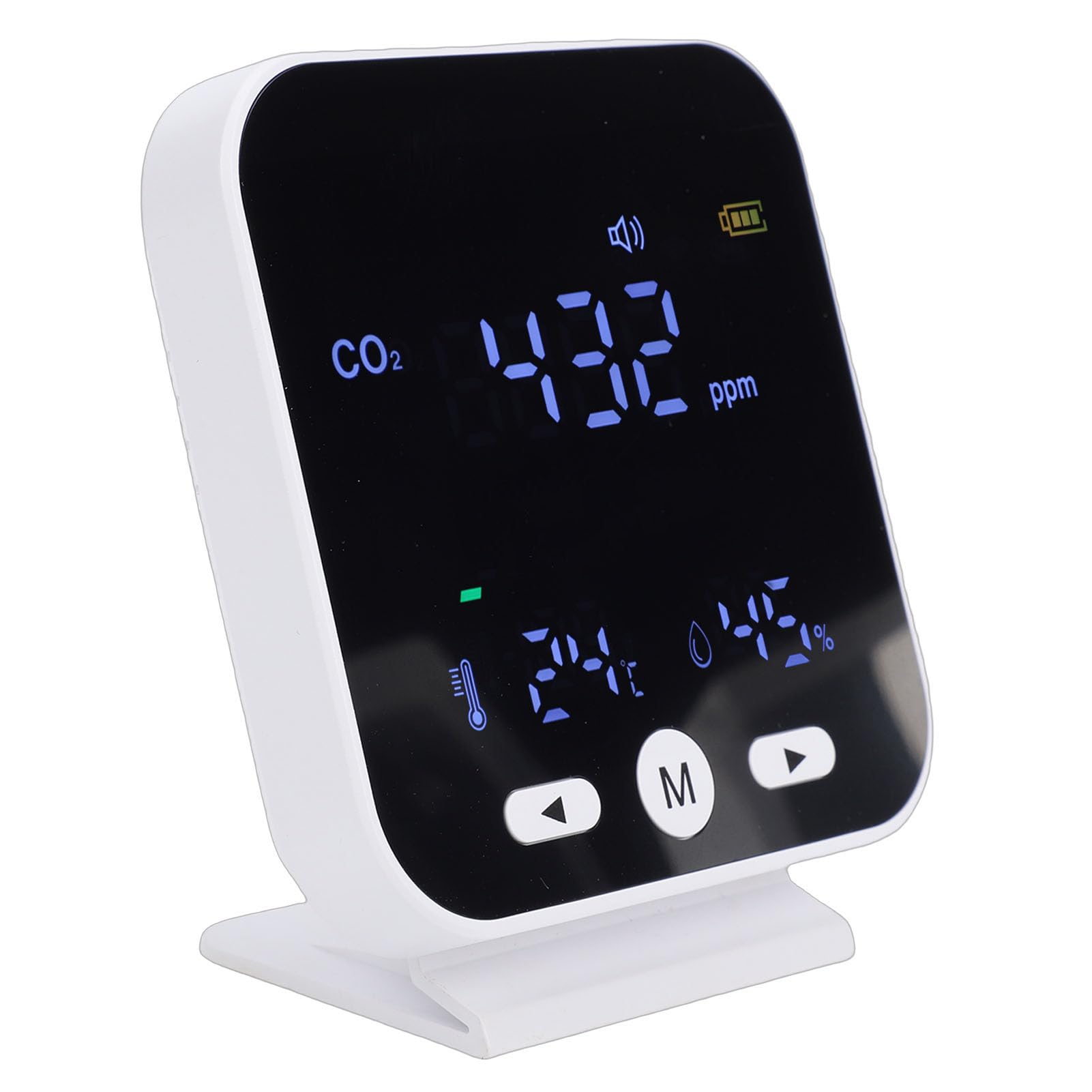
Figure 1: Sanpyl Indoor Air Quality Monitor
2. Informació de seguretat
- Llegiu atentament totes les instruccions abans d'utilitzar el dispositiu.
- No exposeu el dispositiu a temperatures extremes, llum solar directa ni humitat elevada.
- Eviteu col·locar el dispositiu a prop de camps electromagnètics forts.
- No intenteu desmuntar ni reparar el dispositiu vosaltres mateixos. Poseu-vos en contacte amb el servei d'atenció al client si necessiteu servei tècnic.
- Mantingueu el dispositiu allunyat de l'aigua i altres líquids.
- Use only the provided charging cable for charging.
- Ensure proper ventilation around the device for accurate readings.
3. Contingut del paquet
Si us plau, comproveu el contingut del paquet en desembalar-lo per assegurar-vos que hi hagi tots els elements:
- 1 x Sanpyl Indoor Air Quality Monitor
- 1 x Manual d'usuari (aquest document)
- 1 x cable de càrrega USB

Figura 2: Elements inclosos al paquet
4. Producte acabatview
Familiarize yourself with the components and display elements of your Sanpyl Indoor Air Quality Monitor.

Figura 3: frontal i posterior View amb components etiquetats
- CO2 Alarm Signal: Indicates when CO2 levels exceed the set threshold.
- CO2 Level Indicator: Visual representation of CO2 concentration (e.g., color bar).
- Visualització de la temperatura: Mostra la temperatura ambient actual.
- Pantalla d'humitat: Shows the current ambient humidity.
- Botó esquerre: Used for navigation or adjustments.
- Botó d'engegada (M): Used to power on/off the device and access menu options.
- Botó dret: Used for navigation or adjustments.
- Entrada d’aire: Where ambient air enters for sensor readings.
- Port de càrrega micro USB: Per connectar el cable de càrrega.

Figure 4: Clear LED Digital Display
5. Configuració
5.1 Càrrega del dispositiu
- Connect the provided USB charging cable to the Micro USB Charging Port on the device.
- Connecteu l'altre extrem del cable USB a un adaptador de corrent USB estàndard (no inclòs) o a un port USB de l'ordinador.
- The battery icon on the display will indicate charging status. A full charge provides approximately 2000mAh of battery life for extended standby time.
5.2 Engegada/apagada
- Per encendre: Manteniu premut el botó Botó d'engegada (M) for a few seconds until the display illuminates.
- Per apagar: Manteniu premut el botó Botó d'engegada (M) durant uns segons fins que la pantalla s'apagui.
5.3 Col·locació
Place the monitor in a location where it can accurately sample the ambient air. Avoid placing it:
- Directly in front of air vents, windows, or doors.
- Near heat sources or in direct sunlight.
- In areas with high dust or moisture.
- In enclosed spaces where air circulation is poor.

Figura 5: Example Application Scenarios
6. Instruccions de funcionament
6.1 Comprensió de la pantalla
The LED display provides real-time readings for CO2 concentration, temperature, and humidity.

Figure 6: Real-time Monitoring Display
- CO2 (ppm): Carbon dioxide concentration in parts per million.
- Temperatura (°C): Ambient temperature in Celsius.
- Humitat (%): Humitat relativa percentatgetage.
- CO2 Level Indicator: A color bar or emoticon system visually represents CO2 levels:
- Verd: bona qualitat de l'aire.
- Yellow: Moderate air quality.
- Red: Poor air quality, requiring ventilation.
6.2 CO2 Alarm and Reminders
The device is equipped with an audible alarm and visual reminder when CO2 concentration exceeds a preset value (default 1000 ppm).

Figure 7: Excessive Limit Reminder
- When the CO2 level reaches the reminder threshold, the device will emit an audible alert and the display may change color or show a specific icon.
- It is recommended to open windows or activate air purification systems when the alarm sounds.
- Custom Thresholds: The device supports custom CO2 thresholds. Refer to the on-screen menu (accessed via the 'M' button) for instructions on adjusting this setting.
6.3 Ajust de brillantor
The display brightness can be adjusted for comfort in various lighting conditions.

Figura 8: Ajust de la brillantor
- Use the Left and Right buttons to navigate through menu options or adjust values.
- Press the 'M' button to enter the menu and select the brightness setting.
6.4 Calibració
The device supports calibration functions to ensure accuracy over time. Refer to the device's on-screen menu for specific calibration procedures. It is generally recommended to perform calibration in a well-ventilated outdoor environment with known CO2 levels (approximately 400 ppm).
7. Manteniment
7.1 Neteja
- Assegureu-vos que el dispositiu estigui apagat i desconnectat abans de netejar-lo.
- Netegeu l'exterior del dispositiu amb un drap suau i sec.
- No utilitzeu netejadors abrasius, dissolvents ni ruixeu directament sobre el dispositiu.
- Keep the air inlet clear of dust and debris.
7.2 Cura de la bateria
- Carregueu el dispositiu regularment per mantenir la bateria.
- Eviteu esgotar completament la bateria amb freqüència.
- Si guardeu el dispositiu durant un període prolongat, carregueu-lo aproximadament al 50% i guardeu-lo en un lloc fresc i sec.
8. Solució De Problemes
| Problema | Causa possible | Solució |
|---|---|---|
| El dispositiu no s'encén. | Bateria baixa o sense càrrega. | Charge the device using the provided USB cable. Ensure the charging cable is properly connected. |
| Inaccurate CO2/Temp/Humidity readings. | Poor placement, blocked air inlet, or need for calibration. | Relocate the device to an open area. Clear any obstructions from the air inlet. Perform a calibration as per section 6.4. |
| L'alarma sona amb freqüència. | High CO2 concentration in the environment. | Increase ventilation by opening windows or using an air purifier. Check the set alarm threshold (section 6.2). |
| La pantalla és tènue o il·legible. | La configuració de brillantor és massa baixa. | Adjust the display brightness (section 6.3). |
9. Especificacions
| Tipus d'element | Detector CO2 |
| Material | ABS |
| Mostra | Pantalla LED |
| Tipus de sensor | NDIR (Non-Dispersive Infrared) |
| CO2 Detection Range | 400-5000 ppm |
| CO2 Excessive Reminder Value | 1000 ppm (default) |
| Unitat de visualització de temperatura | Celsius |
| Interval de temperatura | -10 ℃ a 50 ℃ (14 °F a 122 °F) |
| Gamma d’humitat | del 20% al 85% |
| Capacitat de la bateria | 2000 mAh |
| Dimensions (L x A x A) | 4.72 x 4.33 x 2.76 polzades |
| Pes de l'article | 9.7 unces |
10. Garantia i Suport
10.1 Informació de la garantia
Sanpyl products are designed and manufactured to the highest quality standards. For specific warranty details, please refer to the warranty card included with your purchase or contact Sanpyl customer support. The warranty typically covers defects in materials and workmanship under normal use.
10.2 Atenció al client
If you encounter any issues or have questions regarding your Sanpyl Indoor Air Quality Monitor, please contact our customer support team. For the most up-to-date contact information, please visit the official Sanpyl weblloc web o consulteu la documentació de la compra.
Assistència en línia: Visit the Sanpyl Store on Amazon