1. Introducció
Thank you for choosing the BOBLOV 4K A29 Wearable Body Camera. This compact and versatile device is designed for high-quality audio and video recording, featuring 4K resolution, night vision, and dual batteries for extended use. This manual will guide you through the setup, operation, and maintenance of your new body camera.
2. Què hi ha a la caixa
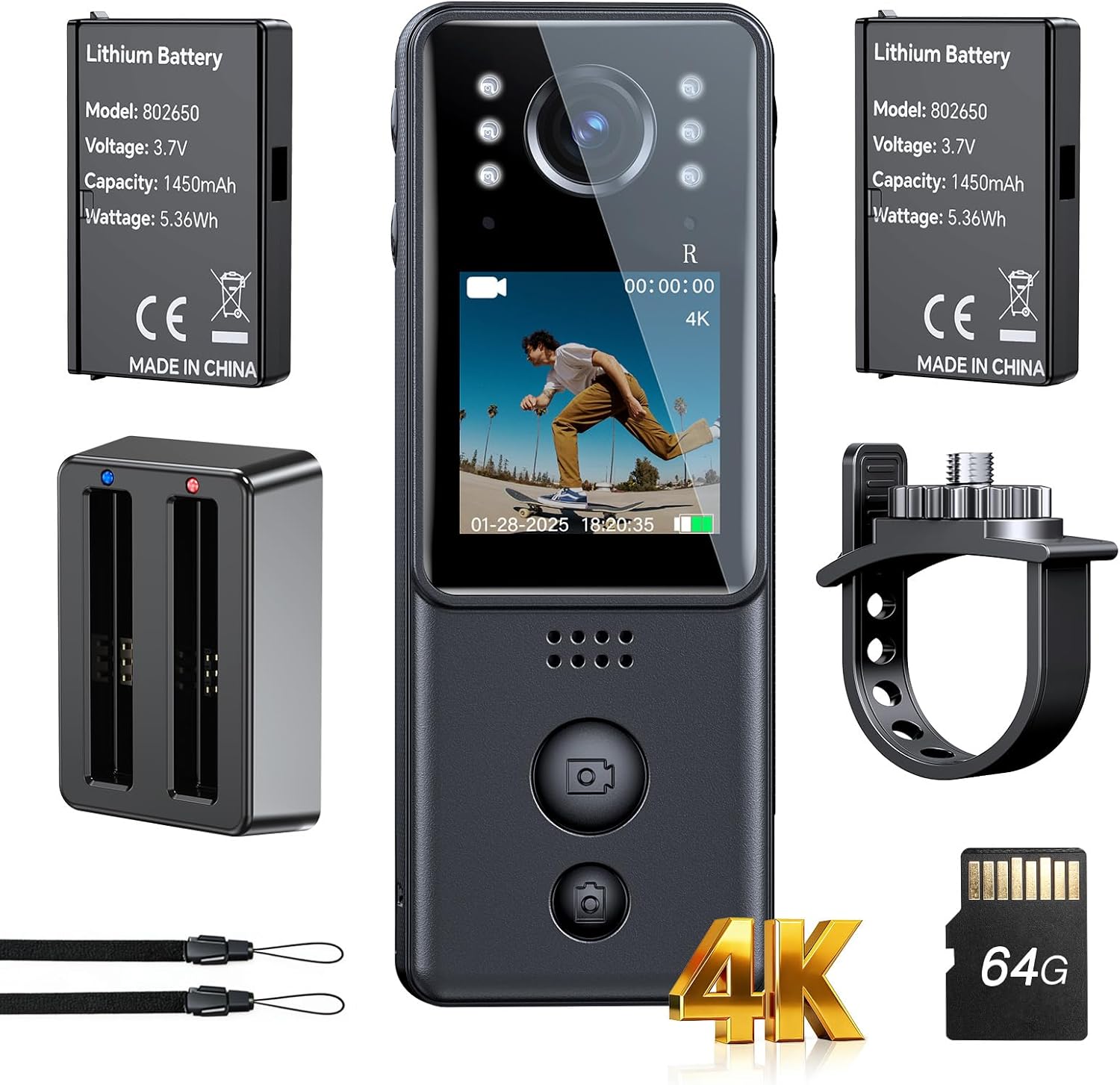
Your BOBLOV 4K A29 Wearable Body Camera package includes the following items:
- 1 x BOBLOV 4K A29 Mini Body Camera
- 2 x Rechargeable 1450mAh Batteries (one pre-installed in camera)
- 1 x Base de càrrega
- 1 x Bike Mount
- 1 x cordó
- 1 x cable USB

3. Característiques del producte
- Ultraclaritat 4K: Capture sharper details and lifelike colors in every frame.
- Dual Batteries & Charging Dock: Two 1450mAh rechargeable batteries and a convenient charging dock provide up to 9 hours of recording at 1080P.
- Compacte i portàtil: Lightweight and slim design (86g) for comfortable daily wear and easy portability.
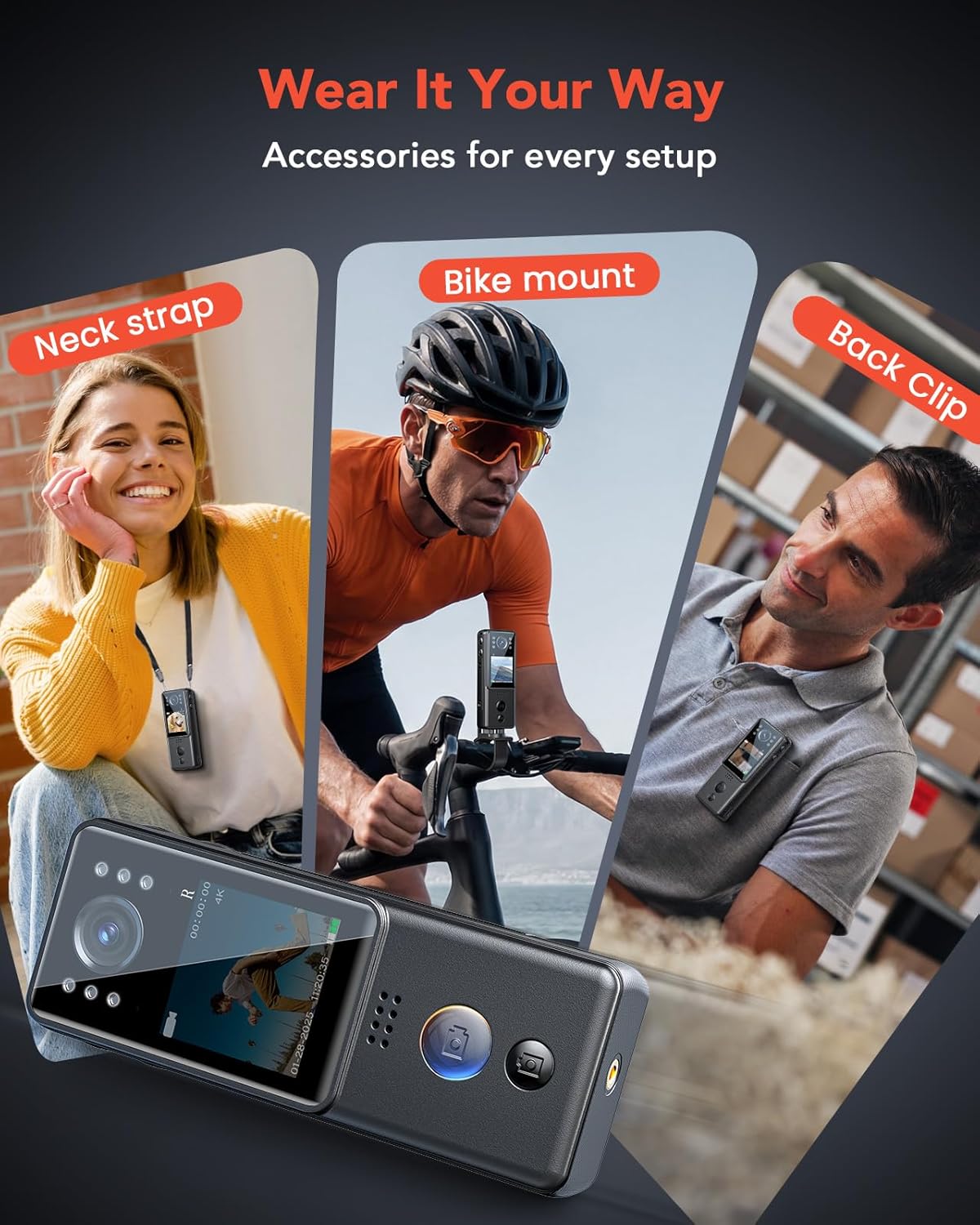
- Multiple Wearing Options: Includes bike mount, back clip, and lanyard for versatile attachment to clothing, bags, or handlebars.
- Reliable Night Vision: Equipped with 6 IR lights for clear recording in dark or low-light environments.
- Fàcil operació: Large, easy-to-find buttons for quick video and photo capture.


4. Configuració i càrrega
4.1. Càrrec inicial
Before first use, fully charge both batteries using the provided charging dock and USB cable. The charging dock allows simultaneous charging of both batteries.
4.2. Inserting/Replacing Batteries
The camera comes with one battery pre-installed. To replace or insert a battery:
- Localitzeu el compartiment de la bateria al lateral de la càmera.
- Press the release mechanism to open the compartment.
- Carefully remove the old battery or insert a new one, ensuring correct orientation.
- Tanqueu el compartiment de manera segura.

4.3. Fixació d'accessoris
Attach the desired accessory (bike mount, lanyard, or back clip) to the camera's mounting points based on your activity. The back clip is designed for secure attachment to clothing or straps.
5. Instruccions de funcionament
5.1. Encendre/apagar
Locate the power button on the side of the camera. Press and hold to power the device on or off.
5.2. Gravació de vídeo
Press the dedicated video button (often marked with a movie camera icon) once to start recording. Press it again to stop recording.
5.3. Captura de fotos
Press the dedicated photo button (often marked with a camera icon) once to take a still picture.
5.4. Gravació d'àudio
Press the dedicated audio button (often marked with a microphone icon) once to start audio-only recording. Press it again to stop.
5.5. Visió nocturna
To activate night vision, long-press the light bulb icon button. The 6 IR lights will illuminate, enabling recording in low-light conditions.
5.6. Navegació del menú
Use the arrow buttons to navigate through the camera's menu options. The 'OK' button is used to select options, and the circular button (often a back/return icon) is used to exit menus or return to the previous screen.
6. Especificacions
| Característica | Detall |
|---|---|
| Marca | BOBLOV |
| Número de model | A29 |
| Resolució de captura de vídeo | 4K |
| Tecnologia del sensor fotogràfic | CMOS |
| Format de captura de vídeo | MOV |
| Mida de la pantalla | 1.3 polzades |
| Característica especial | Visió nocturna |
| Tipus de memòria flash | Micro SD (64GB included) |
| Bateries | 2 x 1450mAh A batteries (included) |
| Dimensions del paquet | 14.81 x 10.21 x 7.19 cm; 340 g |
| País d'origen | Xina |
7. Manteniment
- Mantingueu neta la lent de la càmera amb un drap suau i sense borrissol.
- Eviteu exposar la càmera a temperatures extremes o a la llum solar directa durant períodes prolongats.
- Store the camera and accessories in a dry, cool place when not in use.
- Assegureu-vos que la tapa del port de càrrega estigui ben tancada per evitar l'entrada de pols i humitat.
- Charge batteries fully at least once every month to maintain battery health if not used regularly.
8. Solució De Problemes
- La càmera no s'encén: Assegureu-vos que les piles estiguin completament carregades i inserides correctament.
- Problemes de gravació: Check if the Micro SD card is properly inserted and has sufficient free space. Format the card if necessary (this will erase all data).
- Poca qualitat de vídeo: Ensure the lens is clean and check the selected video resolution in the settings.
- La visió nocturna no funciona: Verify that the IR lights are activated.
- El dispositiu no respon: Use the reset button (if available, typically a small pinhole) to restart the camera.
9. Garantia i Suport
For warranty information, technical support, or service inquiries, please contact BOBLOV customer support. Refer to the contact details provided in your product packaging or visit the official BOBLOV weblloc.
Manufacturer: BOBLOV
Place of Business: support@boblov.com


