Introducció
Thank you for choosing the GOBOULT Partybox X200 Bluetooth Speaker. This powerful portable speaker is designed to deliver high-quality audio with dynamic RGB LED lighting, making it ideal for parties, gatherings, and personal entertainment. This manual will guide you through the setup, operation, and maintenance of your device to ensure optimal performance and longevity.
Contingut del paquet
Marqueu la casella per als elements següents:
- GOBOULT Partybox X200 Bluetooth Speaker
- Cable d'alimentació
- Guia d'inici ràpid
- Control remot
- Targeta de garantia
Producte acabatview
The GOBOULT Partybox X200 features a robust design with dual dynamic drivers for powerful 160W audio output and BoomX bass technology. It includes a professional control panel, multiple input options, and integrated wheels for portability.

Figure 1: GOBOULT Partybox X200 Key Features Overview
Tauler de control
The top-mounted control panel provides access to all speaker functions. Familiarize yourself with the buttons and knobs for optimal control.
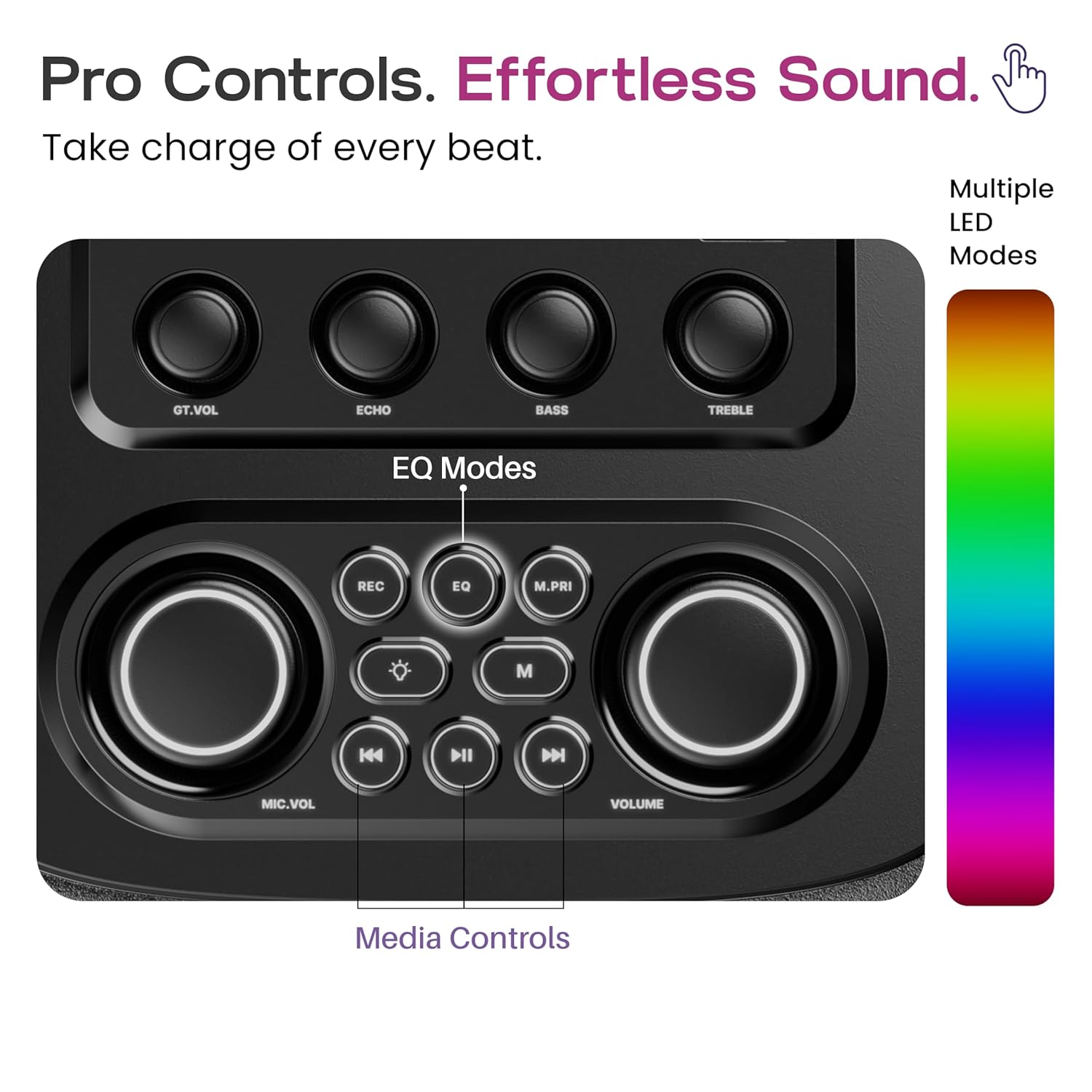
Figure 2: Pro Audio Control Panel Layout
- GT.VOL: Control de volum de guitarra
- ECO: Microphone Echo Effect Control
- BAIX: Ajust del nivell de baix
- AGUTS: Treble Level Adjustment
- REC: Record Function (if supported by connected device)
- EQ: Equalizer Mode Selection (Pop, Rock, Classic, Country, Standard)
- M.PRI: Funció de prioritat del micròfon
- MIC.VOL: Control de volum del micròfon
- VOLUM: Control de volum mestre
- Controls de mitjans: Play/Pause, Skip Forward/Backward
Configuració
- Desembalatge: Traieu amb cura l'altaveu i tots els accessoris de l'embalatge.
- Col·locació: Place the speaker on a stable, flat surface. Ensure adequate ventilation around the unit.
- Càrrega: Before first use, fully charge the speaker using the provided power cable. Connect the power cable to the DC power input port on the speaker and plug it into a standard wall outlet. The charging indicator will show the charging status.
- Encès: Press and hold the power button on the control panel to turn on the speaker.
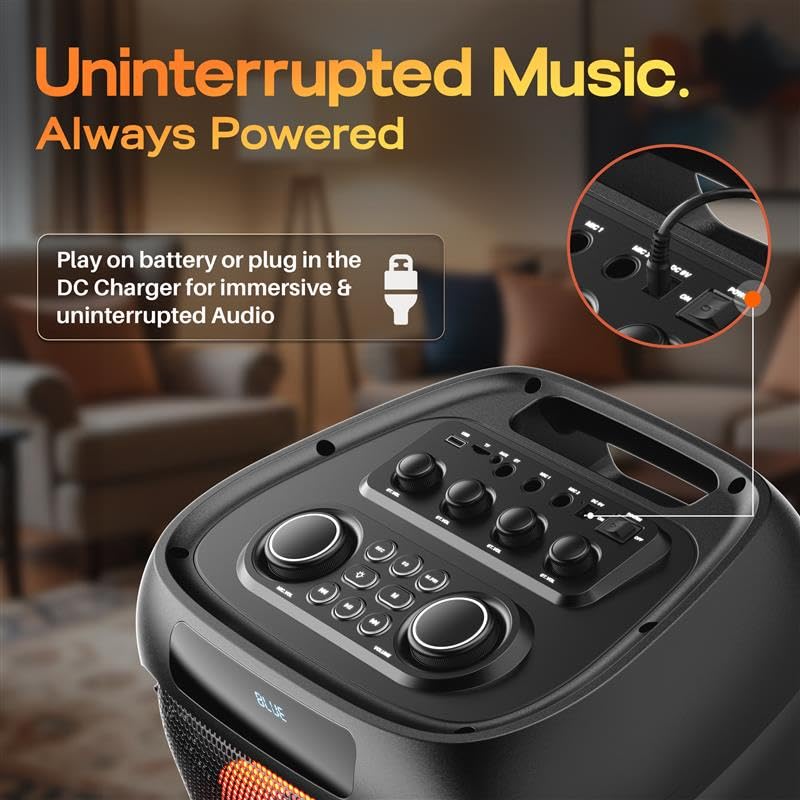
Figure 3: DC Power Input for Charging and Uninterrupted Playback
Instruccions de funcionament
Emparellament Bluetooth
- Turn on the GOBOULT Partybox X200. It will automatically enter Bluetooth pairing mode, indicated by a flashing LED.
- Al dispositiu mòbil (telèfon intel·ligent, tauleta, ordinador portàtil), activeu el Bluetooth i cerqueu els dispositius disponibles.
- Select "GOBOULT Partybox X200" from the list of devices.
- Un cop emparellat, l'altaveu emetrà un so de confirmació i l'indicador LED deixarà de parpellejar.
- Ara pots reproduir àudio des del teu dispositiu a través de l'altaveu.
Reproducció de targetes USB/TF
- Insert a USB drive or TF (MicroSD) card into the respective port on the control panel.
- L'altaveu detectarà automàticament el dispositiu d'emmagatzematge i començarà a reproduir àudio files.
- Use the media control buttons (Play/Pause, Skip Forward/Backward) on the control panel or remote to manage playback.
Entrada AUX
- Connecteu un extrem d'un cable d'àudio de 3.5 mm (no inclòs) al port d'entrada AUX de l'altaveu.
- Connecteu l'altre extrem del cable a la presa de sortida d'àudio del vostre dispositiu extern (per exemple, reproductor MP3, ordinador).
- The speaker will switch to AUX mode. Adjust volume from both the speaker and your connected device.

Figure 4: Multiple Input Modes
Karaoke and Guitar Input
- Connect a microphone to the Mic Input port and/or a guitar to the Guitar Input port.
- Ajusteu el volum del micròfon amb el botó MIC.VOL knob and guitar volume using the GT.VOL perilla.
- Utilitza el ECO knob to add an echo effect to the microphone.
- Premeu el botó M.PRI button to activate Microphone Priority, which lowers music volume when the microphone is in use.

Figure 5: Karaoke and Guitar Ready Inputs
Modes EQ
The Partybox X200 offers five equalizer modes to optimize sound for different music genres:
- Pop
- Roca
- Clàssic
- País
- Estàndard
Premeu el botó EQ button on the control panel or remote to cycle through these modes.

Figura 6: Selecció del mode d'equalització
Llums LED RGB dinàmiques
The speaker features dynamic RGB LED lights that sync with the music. Use the dedicated light button on the control panel or remote to cycle through different light modes or turn them off.

Figure 7: Dynamic RGB LED Lights in Action
Càrrega i bateria
The GOBOULT Partybox X200 is equipped with a 9000 mAh battery for portable use. For extended listening sessions, you can plug the speaker directly into a DC power source. The speaker supports up to 7 hours of direct DC playback.

Figure 8: Battery Life and Direct DC Playback
To charge the speaker, connect the provided power cable to the DC input port and a power outlet. The battery indicator will show the charging status. Ensure the speaker is fully charged before its first portable use to maximize battery life.
Manteniment
- Neteja: Feu servir un drap suau i sec per netejar l'exterior de l'altaveu. No utilitzeu productes de neteja abrasius ni dissolvents.
- Emmagatzematge: Guardeu l'altaveu en un lloc fresc i sec, allunyat de la llum solar directa i de temperatures extremes.
- Resistència a l'aigua: Aquest altaveu no és impermeable. Eviteu exposar-lo a l'aigua o a una humitat excessiva.
- Cura de la bateria: For optimal battery health, avoid fully discharging the battery frequently. Charge it regularly, even if not in use for extended periods.
Resolució de problemes
| Problema | Causa possible | Solució |
|---|---|---|
| Sense poder | Battery is depleted; Power cable not connected properly. | Charge the speaker; Ensure power cable is securely connected. |
| Sense so | El volum és massa baix; S'ha seleccionat un mode d'entrada incorrecte; El dispositiu no està emparellat (Bluetooth). | Increase volume on speaker and source device; Select correct input mode (Bluetooth, AUX, USB/TF); Re-pair Bluetooth device. |
| Connexió Bluetooth inestable | El dispositiu és massa lluny de l'altaveu; Interferències d'altres dispositius. | Move device closer to speaker (within 10 meters); Avoid obstacles between devices; Turn off other Bluetooth devices. |
| El micròfon/la guitarra no funciona | Cable not connected properly; Volume too low. | Ensure cables are fully inserted; Adjust MIC.VOL/GT.VOL knobs. |
Especificacions
- Nom del model: Partybox X200
- Tipus d'altaveu: Altaveu portàtil
- Potència de sortida: 160 watts
- Versió Bluetooth: 5.3
- Connectivitat: Bluetooth, USB, TF Card, AUX, Guitar Input, Mic Input
- Tipus de controlador d'àudio: Conductor dinàmic
- Bateria: 1 Nonstandard Battery (included), Lithium Ion, 9000 mAh (from description)
- Dimensions del producte: 38P x 36A x 84H centímetres
- Pes de l'article: 9.25 quilos
- Mètode de control: Touch (on panel), Remote
- Característiques especials: Bass Boost, Dynamic RGB LED Light, Portable (with wheels), Karaoke & Guitar Support, 5 EQ Sound Modes
- Components inclosos: Power Cable, Quick Start Guide, Remote, Warranty Card
Informació de la garantia
The GOBOULT Partybox X200 comes with a 1 any de garantia del fabricant from the date of purchase. This warranty covers manufacturing defects and workmanship under normal use. Please retain your purchase receipt for warranty claims. The warranty does not cover damage caused by misuse, accidents, unauthorized modifications, or exposure to water.
For warranty service, please contact GOBOULT customer support with your product details and proof of purchase.
Suport
For further assistance, technical support, or inquiries regarding your GOBOULT Partybox X200, please visit the official GOBOULT website or contact our customer service team. Contact details can typically be found on the warranty card or the GOBOULT brand store page.
Assistència en línia: Visit the GOBOULT Store on Amazon


