1. Introducció
The NIIMBOT B1 Label Maker is a portable Bluetooth thermal label printer designed for various labeling needs in home, kitchen, small business, and school environments. It utilizes direct thermal printing technology, eliminating the need for ink or toner. This manual provides comprehensive instructions for setting up, operating, and maintaining your NIIMBOT B1 Label Maker.

Figure 1: The NIIMBOT B1 Label Maker with examples of address, jam, and router labels.
2. Què hi ha a la caixa
Upon unboxing your NIIMBOT B1 Label Maker, please ensure all the following components are present:
- 1 x NIIMBOT B1 Label Maker
- 1 x Roll 50x30mm Label (inside the machine)
- 1 x cable tipus C
- 1 x Manual d'usuari

Figure 2: Package contents of the NIIMBOT B1 Label Maker.
3. Guia de configuració
3.1. Inserting the Label Paper
- Open the paper cover by sliding the switch on the side of the printer.
- Adjust the paper slot to fit your label roll width (supports 20-50mm).
- Ensure the tip of the label tape is facing up and insert the roll onto the spindle so labels feed from underneath.
- Close the paper cover, ensuring 2-5mm of paper remains outside the machine.
- Press the Power Button for 3 seconds to power on. The machine will automatically align the paper.

Figure 3: Proper insertion of the label paper roll into the NIIMBOT B1.
Video 1: B1 Label Maker Operation Video - Demonstrates paper insertion and initial power-on.
3.2. Descàrrega de l'aplicació i emparellament Bluetooth
- Download the "NIIMBOT" app from the Apple App Store (for iOS) or Google Play Store (for Android).
- Assegureu-vos que el Bluetooth estigui habilitat al vostre telèfon intel·ligent.
- Open the NIIMBOT app. Click on "connect" or "unconnected" (top right corner) to initiate pairing.
- The app will search for nearby printers. Select your NIIMBOT B1 device (e.g., B1-XXXXXXXX) from the list to pair.
- Once connected, the app will automatically recognize the label template in the printer.
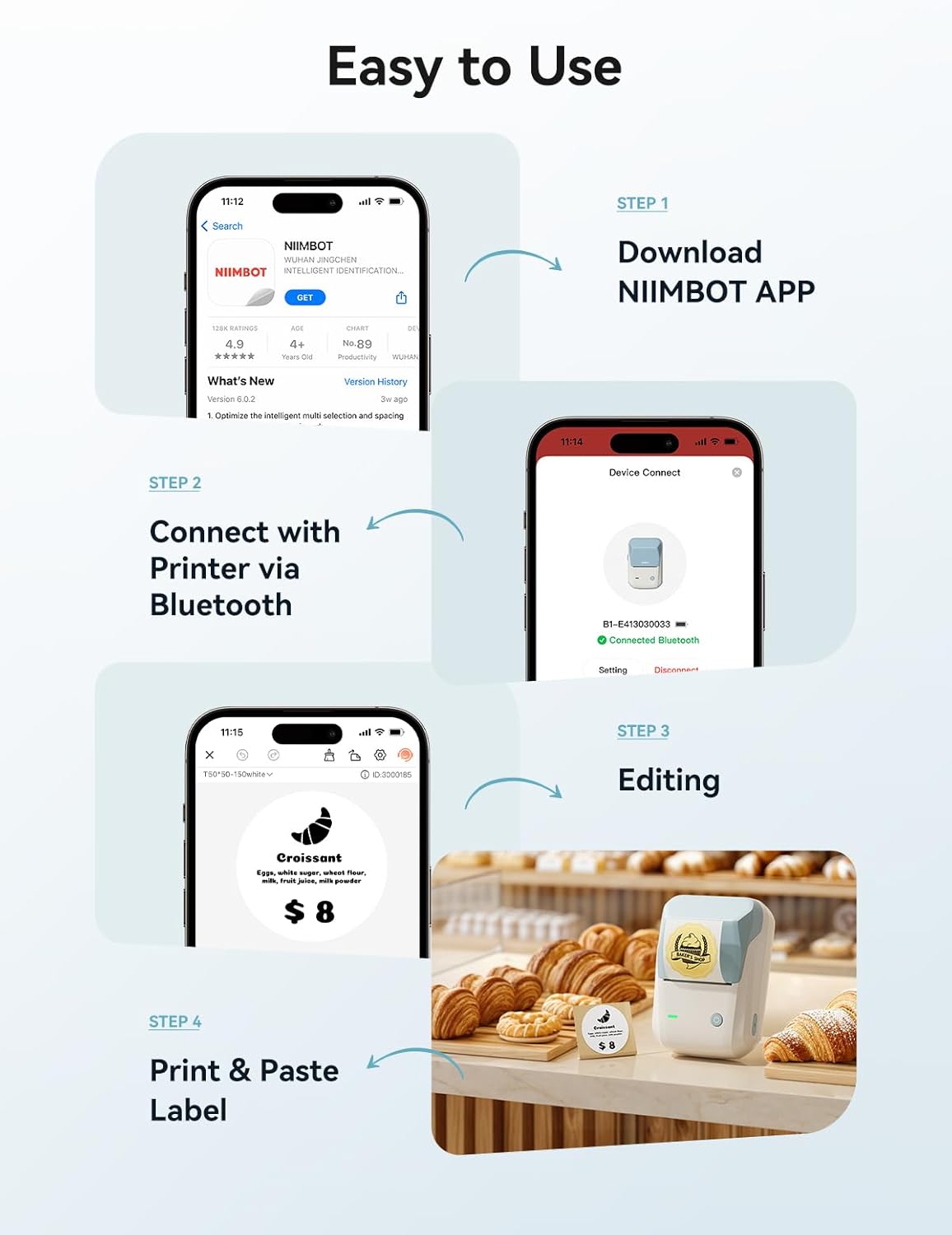
Figure 4: Easy steps for app download, connection, and label printing.
Video 2: NIIMBOT B1 Label Printer for Small Business - Shows app interface and basic printing.
4. Operating Your Label Maker
4.1. Designing Labels with the App
The NIIMBOT app offers extensive customization options:
- Access over 10+ fonts/languages, 100+ borders, and 1500+ symbols.
- Create barcodes, QR codes, and integrate images.
- Utilize pre-made templates or design your own.
- Double-click on text boxes to edit content.

Figura 5: Examples of diverse label applications for the NIIMBOT B1.

Figure 6: More examples of label uses for organization and classification.
4.2. Impressió d'etiquetes
Després de dissenyar l'etiqueta:
- Review the printing preview a l'aplicació.
- Adjust print copies and density as needed.
- Click "Print" to send the design to your NIIMBOT B1 Label Maker.

Figure 7: The NIIMBOT B1 supports label widths from 20mm to 50mm (1-2 inches).

Figure 8: Automatic label rewinds feature prevents waste and ensures precise starting points.
5. Manteniment
To ensure optimal performance and longevity of your NIIMBOT B1 Label Maker, follow these maintenance guidelines:
- Neteja: Netegeu regularment l'exterior de la impressora amb un drap suau i sec. Per al capçal d'impressió, utilitzeu un bastonet de cotó lleugerament humit.ampened with isopropyl alcohol. Ensure the printer is off and disconnected from power before cleaning.
- Emmagatzematge d'etiquetes: Store label rolls in a cool, dry place away from direct sunlight and extreme temperatures to prevent degradation of the thermal paper.
- Cura de la bateria: The built-in 1500 mAh rechargeable battery provides up to 100 days of standby time. For best battery life, avoid fully discharging the battery frequently and store the device with a partial charge if not used for extended periods.
- Protecció del capçal d'impressió: Avoid touching the print head directly with your fingers or sharp objects.
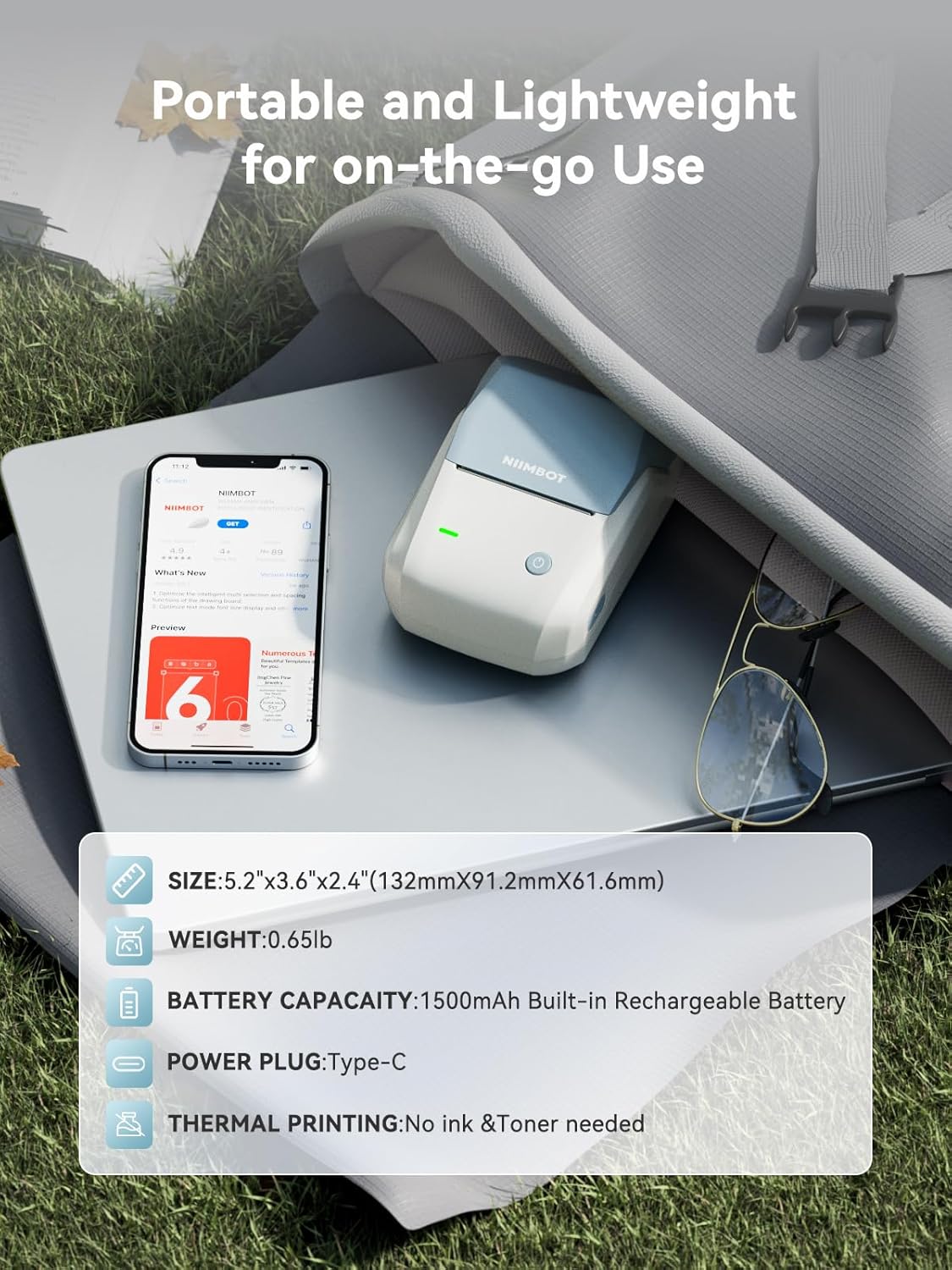
Figure 9: Key features including premium label quality (waterproof, oilproof, scratch-resistant) and long battery life.
6. Solució De Problemes
If you encounter issues with your NIIMBOT B1 Label Maker, refer to the following common troubleshooting steps:
| Problema | Causa possible | Solució |
|---|---|---|
| La impressora no es connecta per Bluetooth | Bluetooth is off on phone; printer is off; app not updated. | Ensure phone Bluetooth is on. Power on the printer. Update the NIIMBOT app to the latest version. Restart both devices. |
| Labels printing faded or unevenly | Low battery; print head dirty; incorrect print density setting. | Charge the printer. Clean the print head. Adjust print density in the app. |
| Label paper not feeding correctly | Paper inserted incorrectly; paper jammed. | Re-insert the label roll correctly, ensuring the tip faces up and feeds from underneath. Clear any paper jams. |
| App not recognizing label size | Incorrect label type; app glitch. | Ensure you are using NIIMBOT compatible labels. Restart the app and printer. |
7. Especificacions
- Nom del model: B1-lan
- Marca: NIIMBOT
- Tecnologia d'impressió: Tèrmica directa
- Tecnologia de connectivitat: Bluetooth
- Resolució màxima d'impressió en color: 203 ppp
- Resolució màxima d'impressió en blanc i negre: 300 ppp
- Velocitat d'impressió màxima en monocrom: 50 mm/s
- Dimensions del producte: 5.2 x 3.6 x 2.4 polzades (132 mm x 91.2 mm x 61.6 mm)
- Pes de l'article: 1.15 lliures (293 g)
- Bateria: Bateria recarregable de 1500 mAh integrada
- Port de càrrega: Tipus-C
- Supported Label Widths: 20mm to 50mm (0.78-1.96 inches)
- Característiques especials: Portable, Bluetooth, APP Editing, Automatic Label Rewinds, Automatic Label Recognition
- Components inclosos: 1 Roll 50x30mm Label, Type-C Cable, User Manual
Figure 10: The compact and portable design of the NIIMBOT B1 Label Maker.
8. Garantia i Suport
The NIIMBOT B1 Label Maker comes with a Limited Warranty. For detailed warranty information, please refer to the warranty card included in your package or visit the official NIIMBOT weblloc.
For technical support, troubleshooting assistance, or any inquiries regarding your product, please contact NIIMBOT customer service through their official weblloc web o la informació de contacte que es proporciona a l'embalatge del producte.
També podeu visitar el NIIMBOT Store on Amazon per obtenir més informació sobre el producte i recursos d'assistència.


