1. Introducció
Thank you for choosing the Gigastone 3-in-1 microSD+SD Adapter+Card Reader Set. This versatile memory solution is designed to provide convenient data transfer and storage across various devices. It includes a high-capacity microSDXC card, an SD card adapter, and a dual-interface card reader (Type-C and Type-A) to meet your diverse needs.
2. Contingut del paquet
Si us plau, verifiqueu que tots els elements que s'enumeren a continuació estiguin inclosos al vostre paquet:
- Gigastone microSDXC Card (128GB)
- Gigastone SD Card Adapter
- Gigastone Type-C & Type-A Card Reader

Image 2.1: Gigastone Prime 128GB microSDXC card.

Image 2.2: Gigastone microSD to SD Adapter.

Image 2.3: Gigastone Type-C and Type-A Card Reader.
3. Característiques del producte
- Compatibilitat versàtil: Includes microSDXC card, SD adapter, and a card reader with both USB Type-C and Type-A connectors for broad device compatibility.
- Alt rendiment: Utilizes high-quality NAND flash and a high-performance controller for reliable data storage and transfer.
- Speed Class U1: Ensures efficient performance for various applications, including Full HD video recording and high-resolution photos.
- Fast Read Speed: Achieves a maximum read speed of 90MB/s (actual speed may vary based on environment).
- Amplia temperatura de funcionament: Functions reliably in temperatures ranging from -25℃ to +85℃.
- Garantia a llarg termini: Amb el suport d'una garantia d'5 any per a la tranquil·litat.
4. Configuració i instal·lació
4.1. Inserting microSD Card into SD Adapter
- Locate the microSD card slot on the SD adapter.
- Gently slide the microSD card into the slot until it clicks into place. Ensure the gold contacts on the microSD card face the same direction as the contacts inside the adapter.
- To remove, push the microSD card slightly further in until it springs out.
4.2. Inserting microSD Card into Card Reader
- Identify the microSD card slot on the card reader.
- Insert the microSD card into the slot with the gold contacts facing downwards (or as indicated by the reader's design). Push until it is fully seated.
- To remove, pull the microSD card directly out of the slot.
4.3. Connecting the Card Reader to Your Device
The card reader features both USB Type-C and Type-A connectors.
- For USB Type-C devices (e.g., MacBook, Android phones with Type-C port): Plug the Type-C end of the card reader directly into your device's USB-C port.
- For USB Type-A devices (e.g., standard laptops, desktop PCs): Plug the Type-A end of the card reader directly into your device's USB-A port.

Image 4.1: Card reader in use with a MacBook (USB-C connection).

Image 4.2: Card reader in use with an Android phone (USB-C connection).
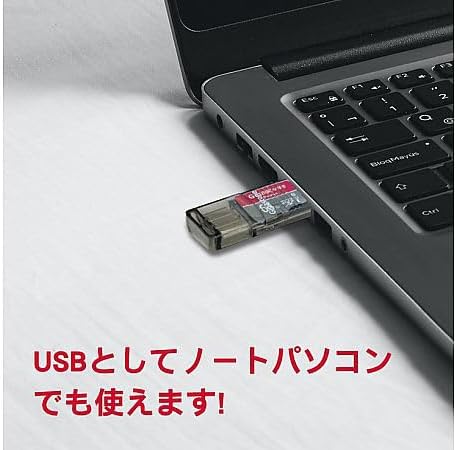
Image 4.3: Card reader in use with a laptop (USB-A connection).
5. Instruccions de funcionament
5.1. Transferència de dades
- Ensure the microSD card is properly inserted into either the SD adapter (then into an SD card slot) or directly into the card reader.
- Connect the SD adapter or card reader to your computer or compatible mobile device.
- Your device should recognize the memory card as a removable storage device. Open the file explorer (Windows) or Finder (macOS) to access its contents. For Android devices, you may need a file aplicació de gestor.
- Arrossegueu i deixeu anar files to and from the memory card as needed.
5.2. Eliminació segura
Always safely eject the memory card from your device before physically removing it to prevent data corruption.
- Windows: Right-click on the drive icon in 'This PC' or the taskbar icon for 'Safely Remove Hardware and Eject Media', then select 'Eject'.
- macOS: Drag the drive icon to the Trash, or click the Eject icon next to the drive in Finder.
- Android: Go to Settings > Storage > Eject SD card (or similar option).
6. Manteniment i cura
- Manejar amb cura: Avoid bending, dropping, or subjecting the memory card, adapter, or reader to strong impacts.
- Mantenir sec: Do not expose the components to water or excessive moisture.
- Temperatura: Operate and store the products within the specified temperature range of -25℃ to +85℃. Extreme temperatures can affect performance and lifespan.
- Contactes nets: If necessary, gently clean the gold contacts on the microSD card and adapter with a soft, dry, lint-free cloth.
- Avoid Static Electricity: Take precautions to avoid static discharge when handling the memory card.
7. Solució De Problemes
7.1. Card Not Recognized
- Check Insertion: Ensure the microSD card is fully and correctly inserted into the adapter or card reader.
- Comprova la connexió: Ensure the card reader or SD adapter is securely connected to your device's port. Try a different USB port if available.
- Prova un altre dispositiu: Test the card and reader with another compatible device to determine if the issue is with the card, reader, or the original device.
- Problemes del controlador: On a computer, ensure your USB drivers are up to date.
- SD Adapter Lock: If using the SD adapter, ensure the 'Lock' switch on the side is in the unlocked (upward) position.
7.2. Slow Data Transfer
- Velocitat del port USB: Ensure you are using a high-speed USB port (e.g., USB 3.0/3.1/3.2) on your device for optimal performance. Older USB 2.0 ports will result in slower speeds.
- File Mida: Transferint molts petits files can be slower than transferring a few large files de la mateixa mida total.
- Rendiment del dispositiu: The speed can also be affected by your computer's or device's processor, RAM, and other running applications.
7.3. Data Corruption
- Always perform a safe ejection before removing the card or reader from your device.
- Avoid sudden power loss during data transfer.
8. Especificacions
| Número de model | GJP-3IN1U1128 |
| Capacitat | 128 GB |
| Classe de velocitat | U1 |
| Velocitat de lectura màxima | 90MB/s (Note: Actual speed may vary depending on the operating environment, hardware, and software) |
| Temperatura de funcionament | -25 ℃ a + 85 ℃ |
| microSD Card Dimensions | 15 mm (W) x 11 mm (D) x 1 mm (H) |
| microSD Card Weight | 0.5 g |
| Components inclosos | microSDXC card, SD card adapter, Type-C & Type-A card reader |
9. Garantia i Suport
The Gigastone 3-in-1 microSD+SD Adapter+Card Reader Set is covered by a Garantia a llarg termini d'5 any from the date of purchase. This warranty covers manufacturing defects and ensures reliable performance under normal usage conditions.
For technical support, warranty claims, or further assistance, please refer to the contact information provided with your purchase documentation or visit the official Gigastone weblloc web. Si us plau, conserveu el comprovant de compra per al servei de garantia.


